
Housekeeping - rooms, cleans and laundry
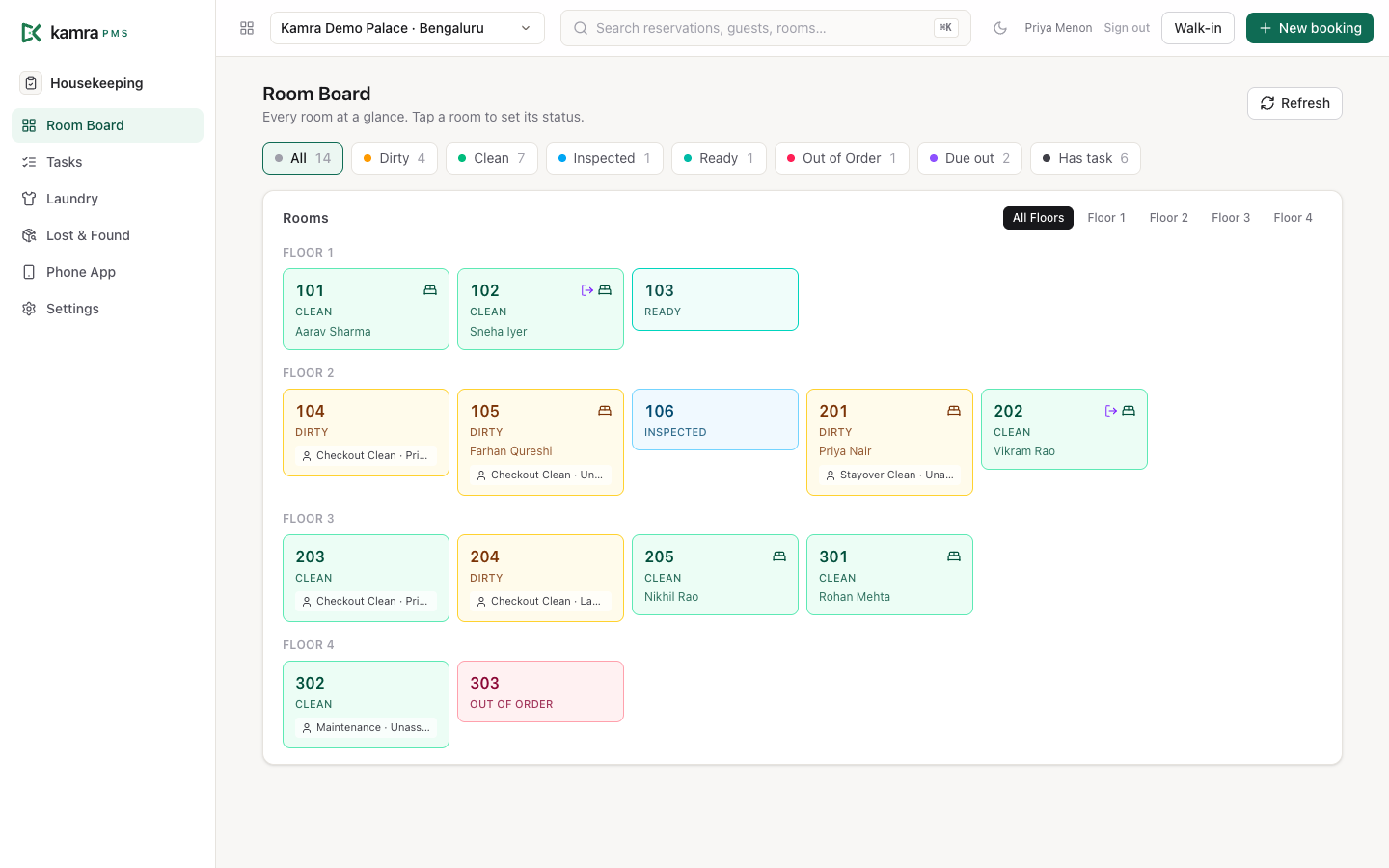
The Housekeeping module keeps every room's status current and gets rooms cleaned in the right order. Supervisors and the front desk watch the Room Board; attendants work from the phone app, where they take rooms, mark them done, post minibar charges and log lost property. Guest laundry runs from the same module.
Before you start
- Give staff the right role. In Settings → Staff & access:
- Housekeeping for attendants. They get the phone app, the task list, laundry and lost & found, and can mark rooms Clean or Dirty.
- Housekeeping Supervisor for supervisors. It includes everything Housekeeping can do, plus the Room Board, the right to mark rooms Inspected, Ready or Out of Order, to pass inspections and to assign tasks, and Settings → Housekeeping.
- The Front Desk and Hotel Admin roles can also use the Room Board and set any status.
- Set the task deadlines in Settings → Housekeeping → Task deadlines (see Settings). Kamra uses them to flag late cleans and escalate them.
- Put a mobile number on each manager's user if you want escalations on WhatsApp. Alerts go out over the property's WhatsApp connection (WhatsApp setup).
- Fill in the laundry rate card if you take guest laundry: Housekeeping → Laundry → Price menu (see Set up the laundry price menu).
Where cleaning tasks come from
- Check-out. When the desk checks a guest out, Kamra marks the room Dirty and creates a Checkout Clean task with High priority. A room that is Out of Order gets no task.
- Maintenance tickets. When someone starts a guest request in the Maintenance category for a room, Kamra adds a Maintenance task to that room (see Operations).
- Inspections. With Inspect after every checkout clean on, a finished checkout clean creates an Inspection task.
- By hand. Housekeeping → Tasks → New: pick the room, the type (Checkout Clean, Stayover Clean, Deep Clean, Inspection, Maintenance), the priority and an optional note.
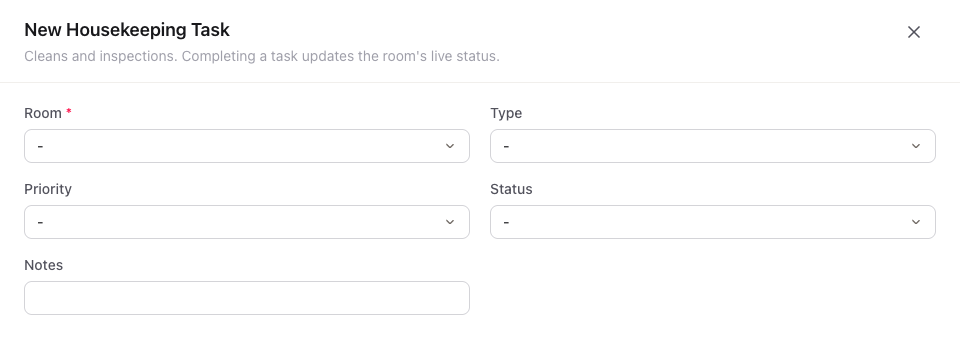
Every task gets a deadline when it is created: its priority's minutes from Task deadlines.
Check every room on the Room Board
- Open Housekeeping → Room Board.
- Each tile shows the room number, its status, the guest staying in it, and the open task with its type and assignee. A bed icon means the room is occupied; an arrow icon means the guest is due out today.
- Use the buttons along the top to show only Dirty, Clean, Inspected, Ready or Out of Order rooms, rooms Due out today, or rooms that Has task. Each button shows its count. The Ready button only appears while at least one room is Ready.
- Use All Floors / Floor 1 … to show one floor.
The board reloads every 30 seconds. Press Refresh to reload now.
Change a room's status
- On the Room Board, click the room.
- Pick Mark Clean, Mark Dirty, Mark Inspected, Mark Ready or Mark Out of Order.
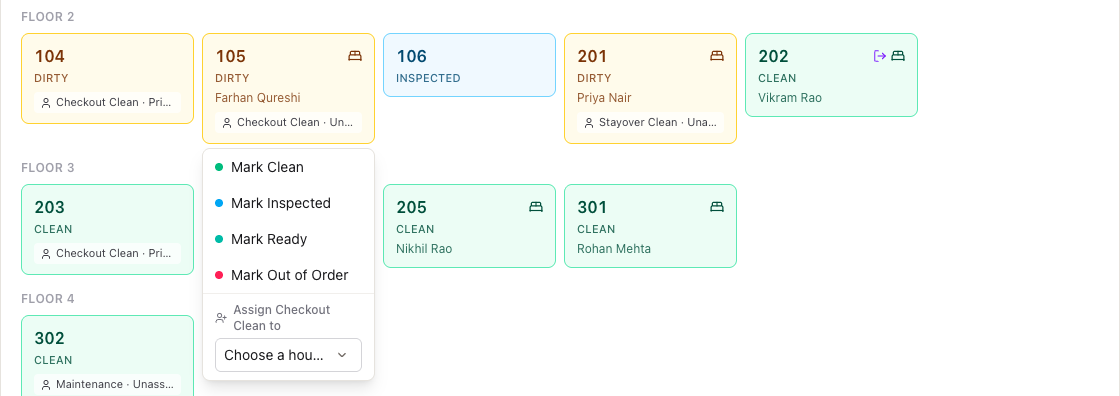
Ready means the room passed its inspection, for hotels that inspect every checkout clean (see Settings). Attendants only see Mark Clean and Mark Dirty. Passing a room (Inspected or Ready) or taking it Out of Order is for a supervisor, the front desk or a Hotel Admin. Kamra checks this on the server too, and logs every change.
Work from the phone app
The phone app is made for one hand on a housekeeping trolley. Open Housekeeping → Phone App, or go to /kamra/hk on your Kamra address, and sign in. Add it to the phone's home screen so staff open it like an app.
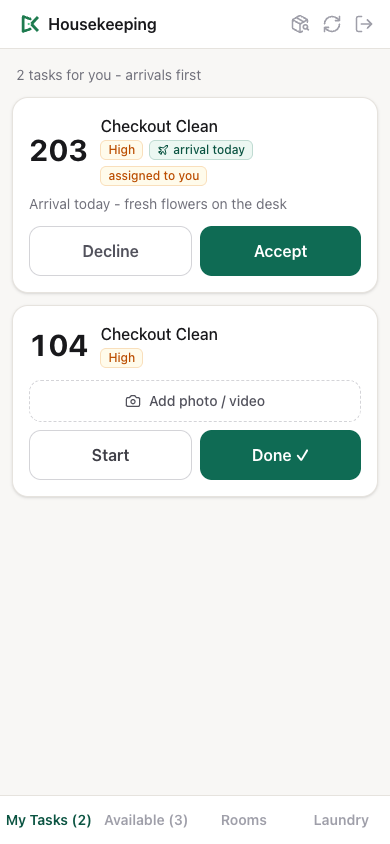
The app has four tabs along the bottom:
| Tab | What it shows |
|---|---|
| My Tasks | Tasks assigned to you or taken by you |
| Available | Tasks nobody has taken yet |
| Rooms | Every room and its status; tap an occupied room to post a charge |
| Laundry | Pickup requests and bags in hand (same as the desk's laundry board) |
Tasks are sorted so the right room comes first: rooms with a guest arriving today, then checkout cleans, then by priority (Urgent, High, Medium, Low), then oldest first. Each card shows:
- a star for a VIP guest,
- arrival today (with the guest's arrival time when the booking has one),
- the guest's requests from the booking, and any task note,
- overdue once the task is past its deadline.
Take a room from the pool
- Open Available.
- Tap Take this room on a card. The task moves to My Tasks.
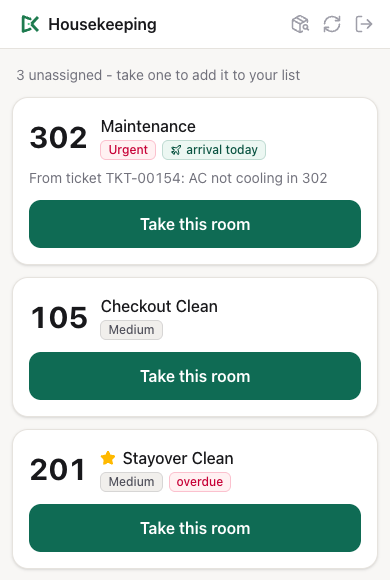
If someone else took the room a moment earlier, Kamra refuses the second tap, shows Already taken by … at the top, and the card leaves Available.
Accept or decline a room you were given
A task assigned to you shows assigned to you with Accept and Decline.
- Tap Accept to keep it.
- Tap Decline, type a reason if you want (it's optional), and tap Send back. The task goes back to Available and the reason is kept on the task. Keep cancels.
Clean a room
- On My Tasks, tap Start when you begin. The card shows In progress….
- To keep proof of the clean, tap Add photo / video and take a photo or pick one. Add as many as you need; tap the red × on a thumbnail to remove it.
- Tap Done ✓.
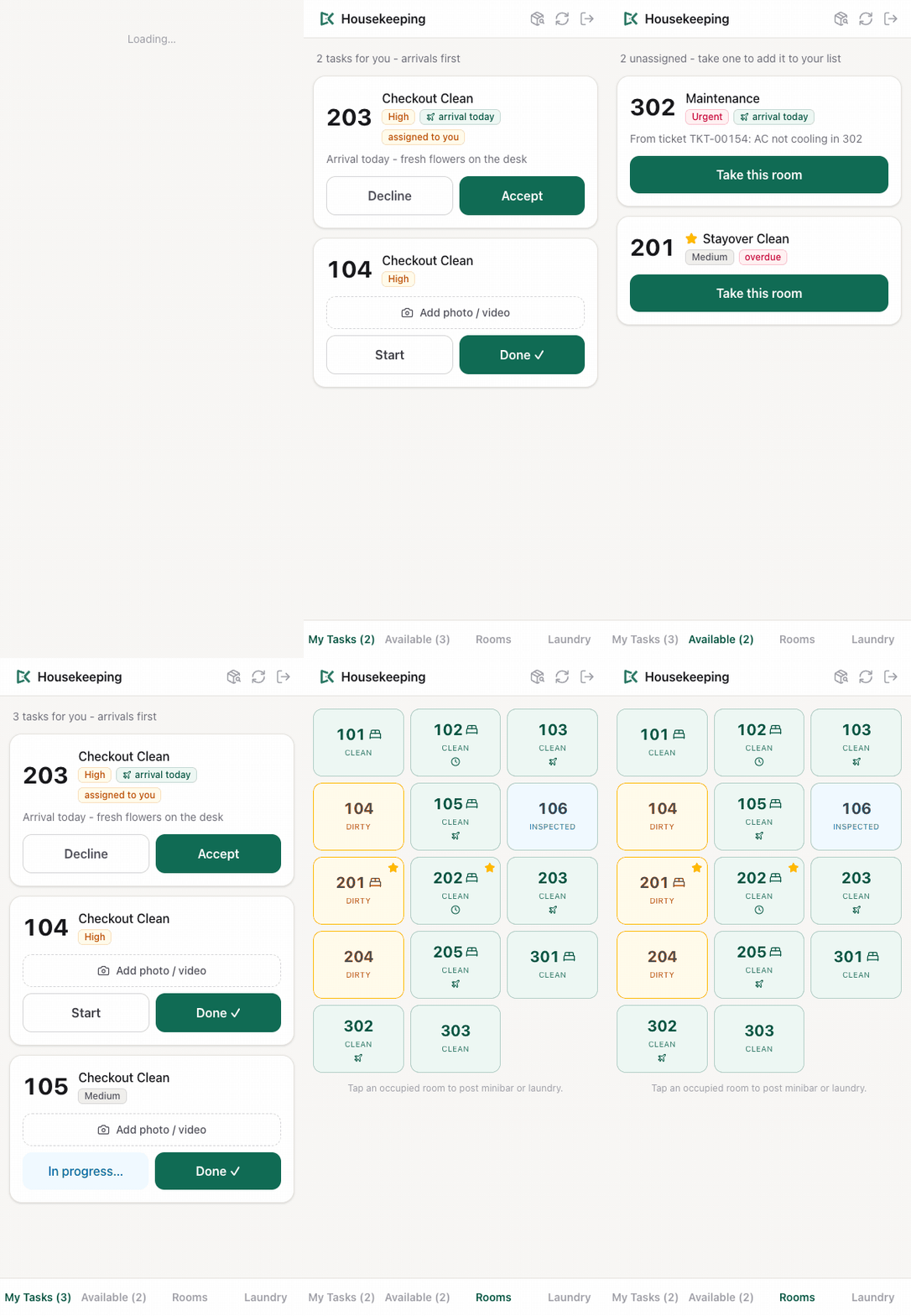
When a clean is done, the room turns Clean on every screen. If the clean finishes after its deadline, the task is marked as a missed deadline. If a guest is arriving today in that room, the front desk gets a WhatsApp message that the room is ready.
Pass an inspection
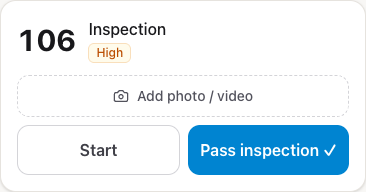
An Inspection card has Pass inspection ✓ instead of Done ✓. Only a supervisor (Housekeeping Supervisor, Front Desk or Hotel Admin) can tap it; an attendant sees the button greyed out as Supervisor passes. Passing the inspection marks the room Ready when Inspect after every checkout clean is on, and Inspected otherwise. It never sets the room back to Clean.
If the server refuses a tap, the app says why at the top of the screen, for example Already taken by … when someone else took the room first.
The front desk sees the photos from the room's latest clean on Today (the camera button on the room), and on the task in Housekeeping → Tasks.
Assign a room to a housekeeper
Staff take rooms from the Available pool themselves. A supervisor can also hand a room's open task to a named person:
- On the Room Board, click the room.
- Under Assign task to (for example Assign Checkout Clean to), pick the person in Choose a housekeeper….
The task then shows on that person's My Tasks as assigned to you until they accept or decline it. The list only has enabled users with the Housekeeping or Housekeeping Supervisor role who work at this property. Kamra refuses the assignment if you aren't a supervisor (Housekeeping Supervisor, Front Desk or Hotel Admin), if the person isn't housekeeping staff here, or if the task is already Done or Verified. AI agents connected over MCP use the hk_assign_task tool, with the same rules.
See all tasks
Housekeeping → Tasks lists every task, newest first, with its room, type, priority and status. Click a task to change it or to see its photos.
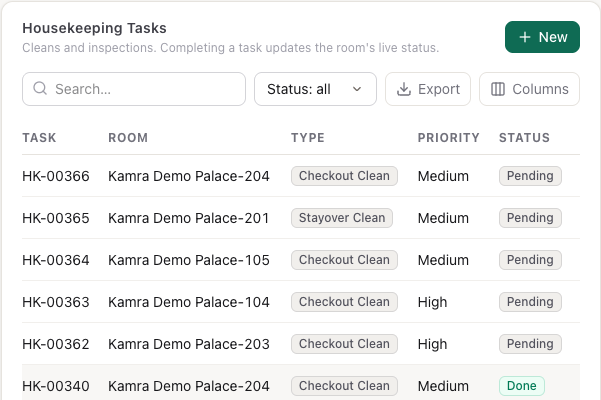
A task's status goes Pending → In Progress → Done. Verified is for an inspection: setting a task to Verified marks the room Inspected (or Ready when Inspect after every checkout clean is on). From the phone app, Done on an inspection counts as Verified, and only a supervisor can verify. Setting an inspection to Done here closes the task without changing the room. Use the Status filter to show one status.
Late tasks and escalation
Every 15 minutes Kamra looks for open tasks past their deadline:
- As soon as a task is overdue, it is marked as a missed deadline and everyone with the Front Desk role gets a WhatsApp message: room, task, priority, minutes past due, ending escalated to the front desk.
- If it is still open after another full deadline (for example, a High clean still open 45 minutes after it was due), everyone with the Hotel Admin role gets a second message, ending escalated to the hotel admin.
Messages go to the mobile number on each user's record, over the property's WhatsApp connection. Without a connected WhatsApp number the escalation is only written to the activity log.
Post minibar and laundry charges from the room
- In the phone app, open Rooms.
- Tap an occupied room (rooms with a bed icon).
- Pick Minibar or Laundry, write what was used ("2 cola, 1 water") and the amount.
- Tap Post.
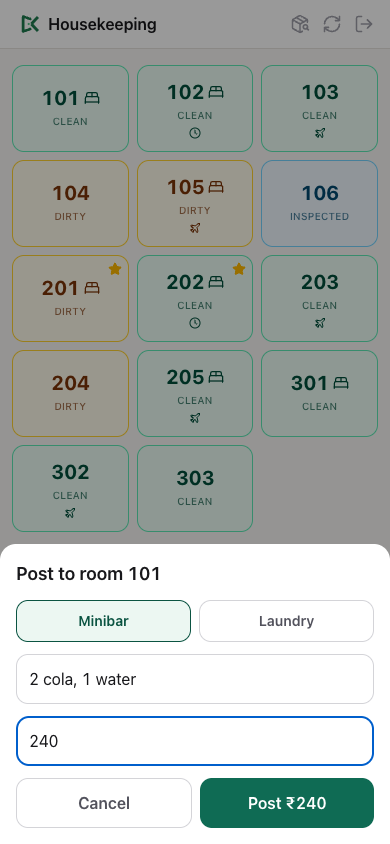
The charge goes on the in-house guest's folio. Housekeeping can only post Minibar or Laundry, the amount must be more than zero, and the room must have a checked-in guest. Tax on the line is worked out by Kamra, not by the housekeeper: laundry at your country's rate for services, minibar at its food and drink rate (see Country setup). For counted laundry bags, use the laundry board instead (below): it prices from the rate card.
Handle guest laundry
Housekeeping → Laundry (also under Finance → Laundry) is the laundry board. Pickup requests waits to be collected, In hand are bags out with the laundry, Recent are the last delivered or cancelled bags.
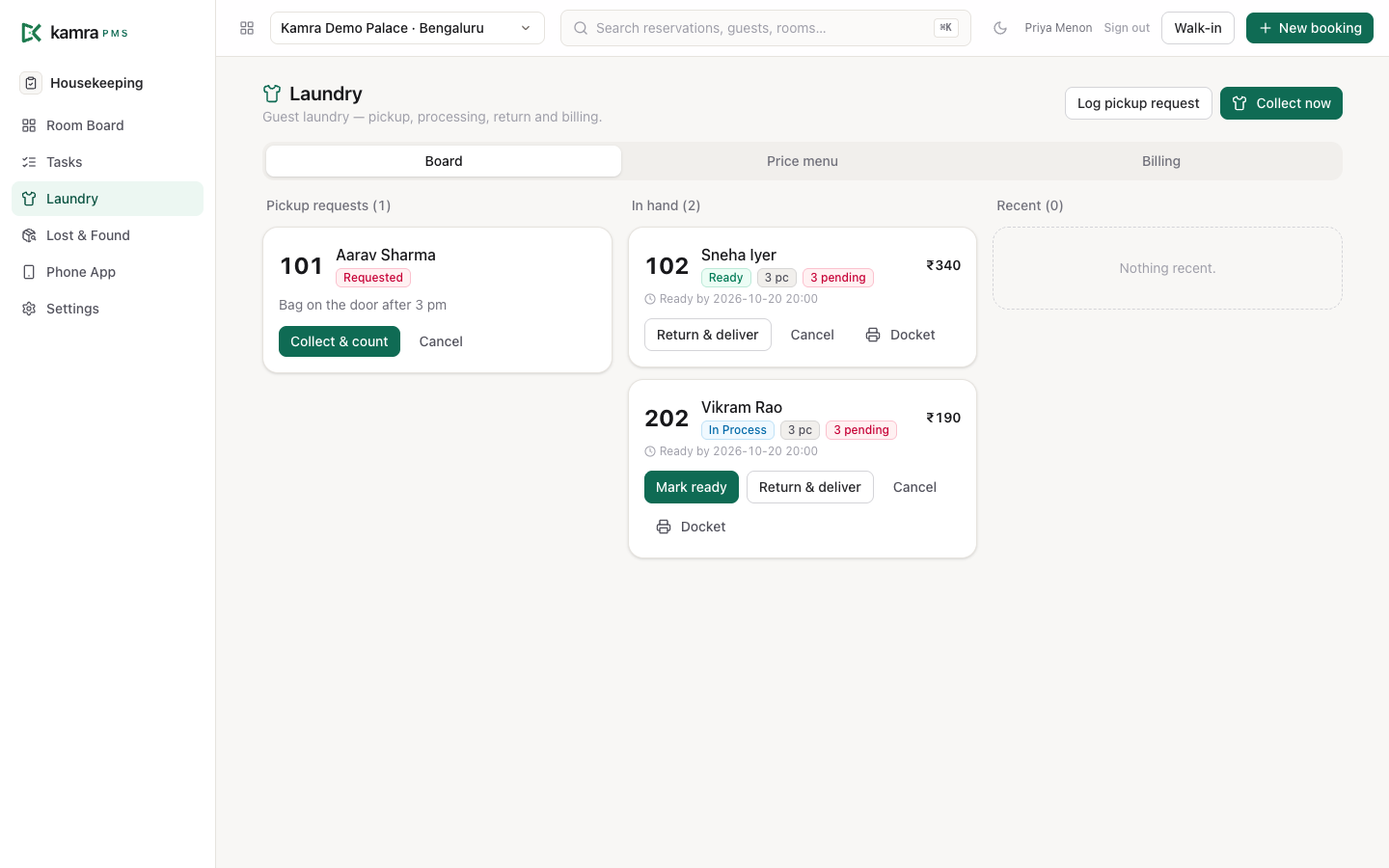
- Log the request. Press Log pickup request, pick the room, press Standard service to switch it to express if the guest wants it, add a note ("bag on the door after 3 pm"), and press Add to pickup queue. Guests can also ask for a pickup themselves from their online check-in page once they are checked in.
- Collect and count. At the door, press Collect & count on the request. Use + and − on each item and service, with the guest. Prices come from the price menu; you can't type a price. Press Collect … pieces. To take a bag with no request first, press Collect now.
- Send it. Press Send to laundry, and Mark ready when it comes back.
- Return and deliver. Press Return & deliver, count each item back in (or press Everything came back), and press Deliver & bill.
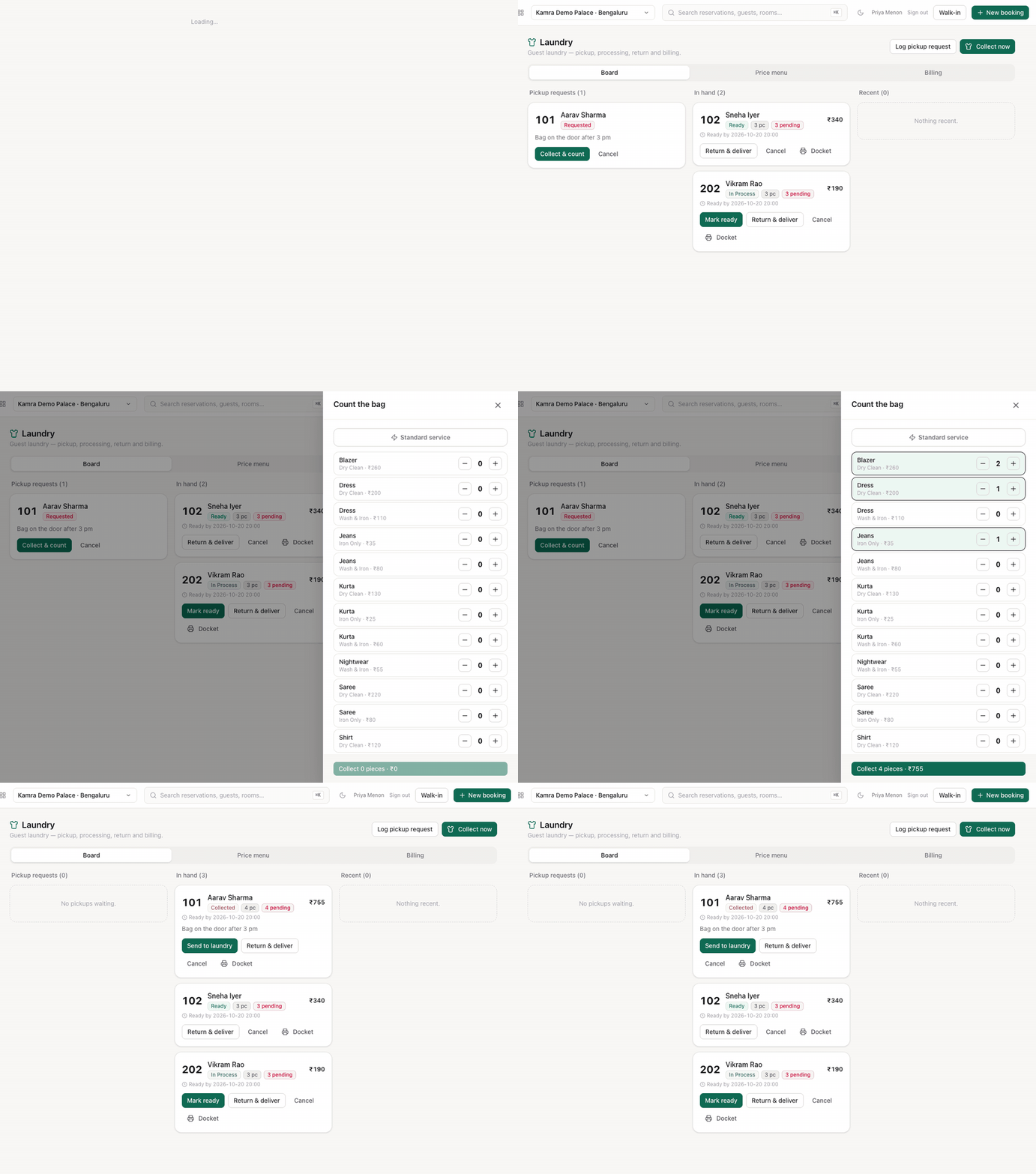
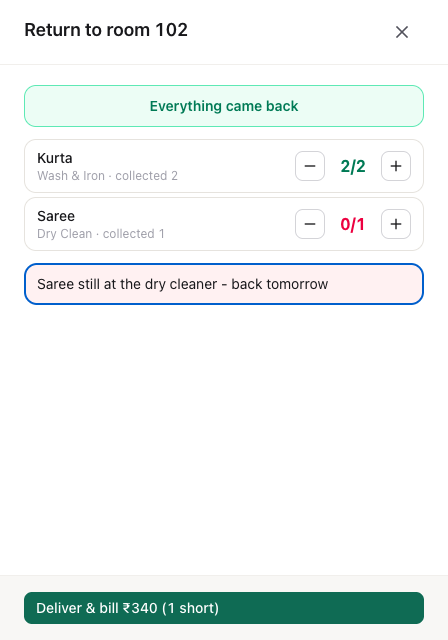
When the bag is delivered, Kamra posts the laundry bill to the guest's folio. If a piece is missing, you must write why in the shortage box before you can deliver; the note stays on the order.
Each bag gets a Ready by time: 8 pm today for express, 8 pm tomorrow for standard. A bag past that time shows overdue. Docket prints a slip for the bag on the thermal printer.
House laundry and free bags. In Collect now, choose House (uniforms / linen) for hotel items, or tick Complimentary - don't bill the guest. Kamra counts these bags but never bills them.
Cancel a bag that won't be done. You must give a reason; it is saved on the order.
The Billing tab shows laundry revenue for the last days: billed orders, pieces, revenue by service, and how many bags were house or complimentary.
Set up the laundry price menu
- Open Housekeeping → Laundry → Price menu.
- Press Add rate. Enter the item (Shirt, Saree…), the service (Wash & Iron, Dry Clean or Iron Only), the rate and, optionally, the express rate.
- Press Save.
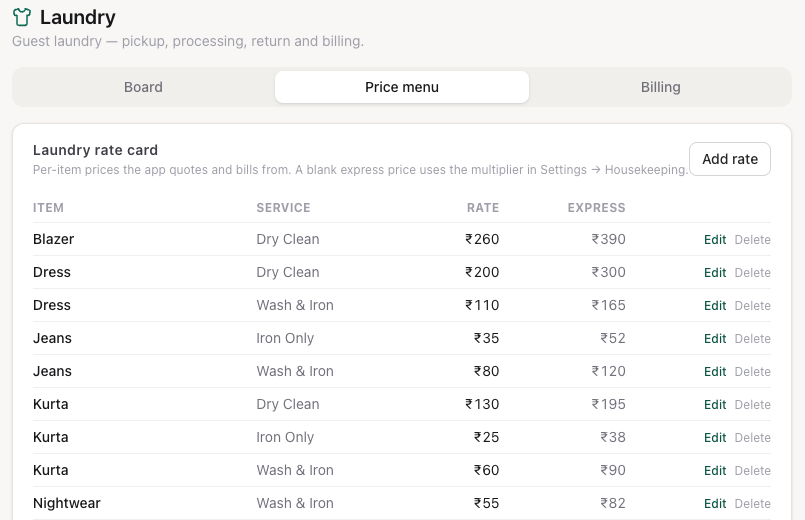
A blank express rate uses the Express price multiplier in Settings → Housekeeping (1.5 × the rate by default). The same card is in Settings → Housekeeping → Laundry rate card, with Import CSV and Export CSV for loading a whole list. Front Desk, Finance and Hotel Admin can change rates; housekeepers can only read them.
Log lost, missing and damaged items
From the phone:
- Tap the box icon at the top of the phone app.
- Choose Found, Missing or Damaged.
- Write what it is, pick the room if you know it, and tap Log it.
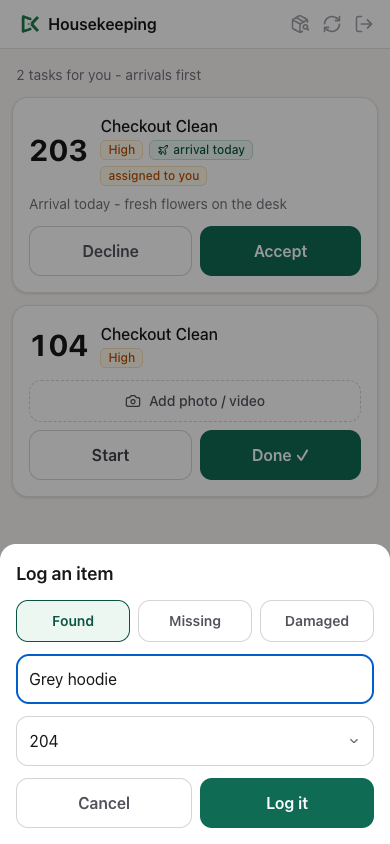
The item lands in Housekeeping → Lost & Found as In Storage, with today's date and your name. The desk can also add items there with New.
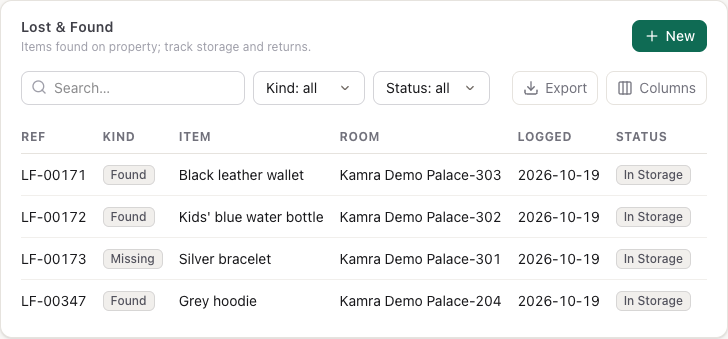
When the guest collects the item, open it and set Status to Returned, the Guest and Returned on. Use Disposed for items you throw away or donate. Filter the list by Kind and Status.
Hand over a shift
Finance → Shift Handover keeps a record per shift (Morning, Evening, Night): opening cash, cash collected, payouts, closing cash, who you handed over to, and notes for the next shift. Press New, fill it in, and set Status to Closed when the next shift has taken over.
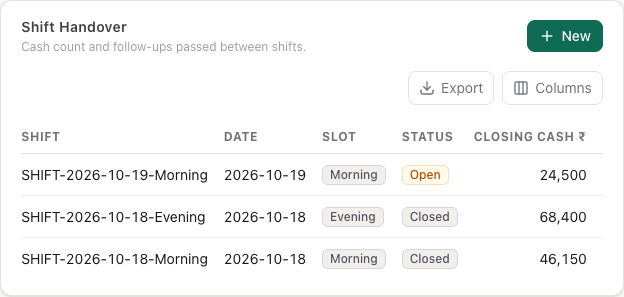
It is a plain record: Kamra doesn't calculate the cash figures. For the till count with variance, use the cashier's My Till and Shift Report (see Billing).
Settings
Settings → Housekeeping (Hotel Admin or Housekeeping Supervisor). Module on hides or shows the whole module.
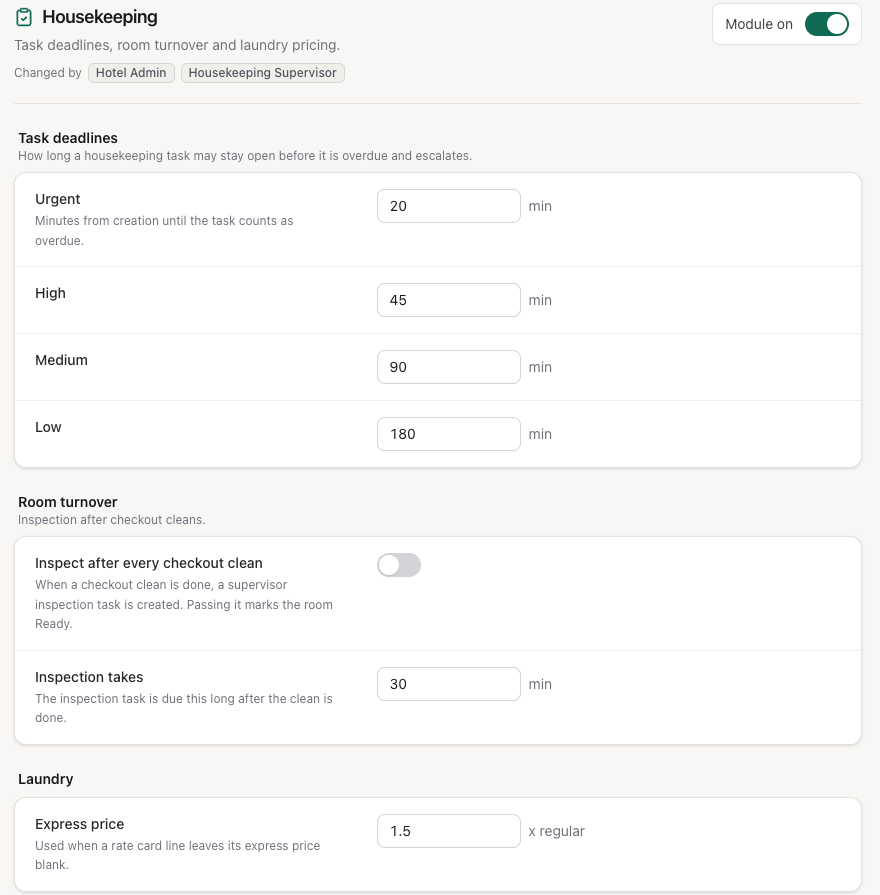
| Setting | Where | Default | What it does |
|---|---|---|---|
| Urgent / High / Medium / Low | Task deadlines | 20 / 45 / 90 / 180 min | Minutes from creation until a task of that priority is overdue and escalates |
| Inspect after every checkout clean | Room turnover | Off | When a checkout clean is done, creates a High Inspection task; passing it marks the room Ready |
| Inspection takes | Room turnover | 30 min | The deadline of that inspection task |
| Express price | Laundry | 1.5 × regular | Express price for rate card lines with no express rate |
Good to know
- A task's deadline is set when it is created. Changing a deadline in Settings only affects new tasks.
- Done on a clean sets the room to Clean. An inspection never sets a room back to Clean: passing it marks the room Inspected, or Ready when inspections are on.
- Photos and videos on a task can be up to 25 MB each.
- The phone app and the Room Board update by themselves every 20 and 30 seconds; tap Refresh after a change made on another device.
- A laundry pickup request needs a checked-in guest in the room. A guest can't request a second pickup while one is still waiting.
Troubleshooting
"Only a housekeeping supervisor can set a room to Inspected." (or Ready, or Out of Order) The user has the Housekeeping role only. Give them Housekeeping Supervisor, or ask a supervisor or the desk to pass the room. The same goes for "Only a housekeeping supervisor can pass an inspection or verify a clean." and "Only a housekeeping supervisor can assign tasks."
"… is not housekeeping staff at this property." The person you picked has no Housekeeping role, is disabled, or is limited to other properties. Check them in Settings → Staff & access.
"No checked-in guest in that room to bill." The minibar or laundry post needs a guest who is checked in. Check the room on the front desk's Today screen.
"No rate for … add it to the rate card first." That item and service isn't on the price menu, or it was disabled. Add it in Laundry → Price menu.
"Still pending: …" when delivering laundry. Count the missing pieces back in, or write a shortage note.
Escalations don't arrive on WhatsApp. Check that the property has an active WhatsApp connection in Operations → Channels, and that the Front Desk and Hotel Admin users have a mobile number on their user record.
The phone app shows nothing assigned. Open Available: tasks wait there until someone takes them.
For developers
The phone app, Room Board and tasks run on kamra.api endpoints (hk_queue, hk_update_task, hk_claim_task, hk_accept_task, hk_reject_task, hk_assign_task, hk_staff, hk_post_consumable, hk_log_item, room_board, set_housekeeping_status); laundry runs on kamra.laundry. Escalation is the scheduled job kamra.housekeeping.escalate_overdue_tasks (every 15 minutes). AI agents use the same calls as MCP tools - see the MCP tools (laundry) and the API reference.