
Reports and dashboards
Kamra's reports answer the daily questions: how full were we, what did we earn, what came in, are we on budget, where does the business come from, and are guest requests handled in time. Front Desk staff see the property dashboard; Finance, Revenue Manager and Hotel Admin see the money and portfolio views.
Before you start
- Run the night audit. Occupancy, ADR, RevPAR and room revenue count the room nights posted on folios, and the night audit posts them. Until tonight's audit runs, today shows no room revenue.
- Set your monthly targets if you want budget vs actual: see Track the month against budget.
- Money is shown in the property's currency and tax columns follow your country pack (Country setup).
See today at a glance
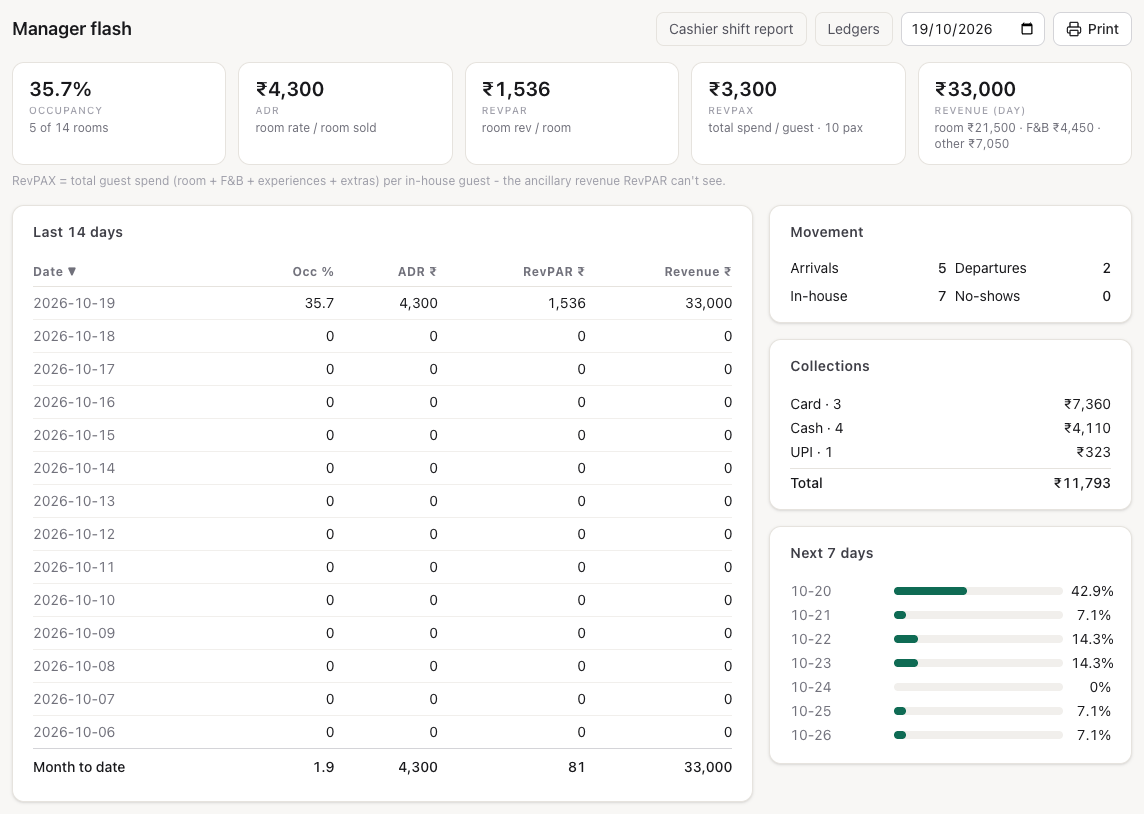
Open Front Desk → Dashboard. This property shows:
- Occupancy today, ADR and RevPAR (month to date), Revenue and Collections today, and Outstanding (owed on open folios);
- Statistics (month to date): occupancy, revenue, ADR, RevPAR and rooms sold;
- Housekeeping: clean, dirty, inspected and out-of-order rooms, open and overdue tasks;
- Finance: collected today, outstanding and open folios.
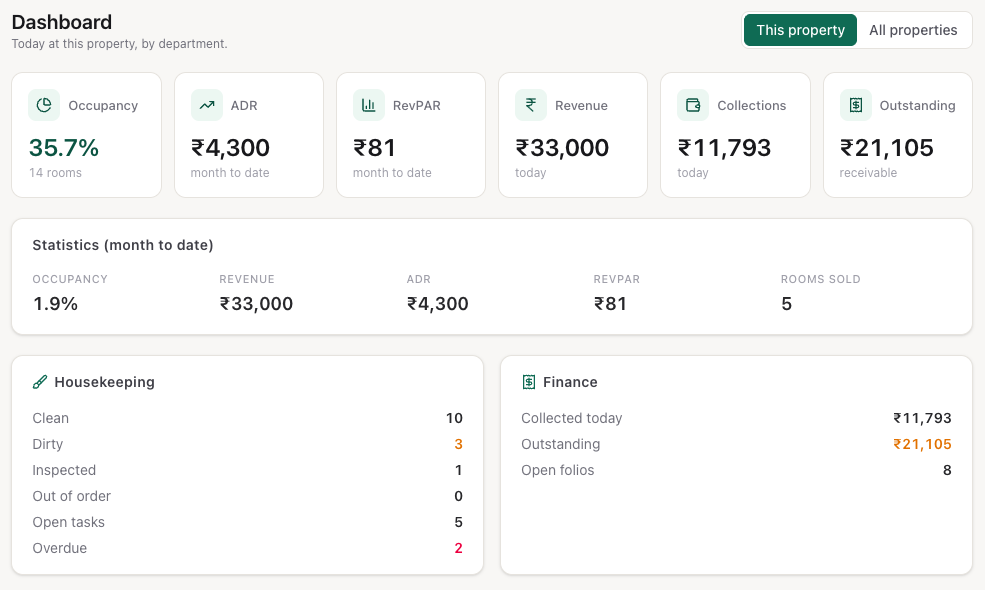
All properties (shown when you have more than one property, for Finance, Revenue Manager and Hotel Admin) rolls the same numbers up across the portfolio, with a By property table: occupancy, arrivals, departures, in-house, revenue, collected and outstanding for each hotel.
Read the manager flash
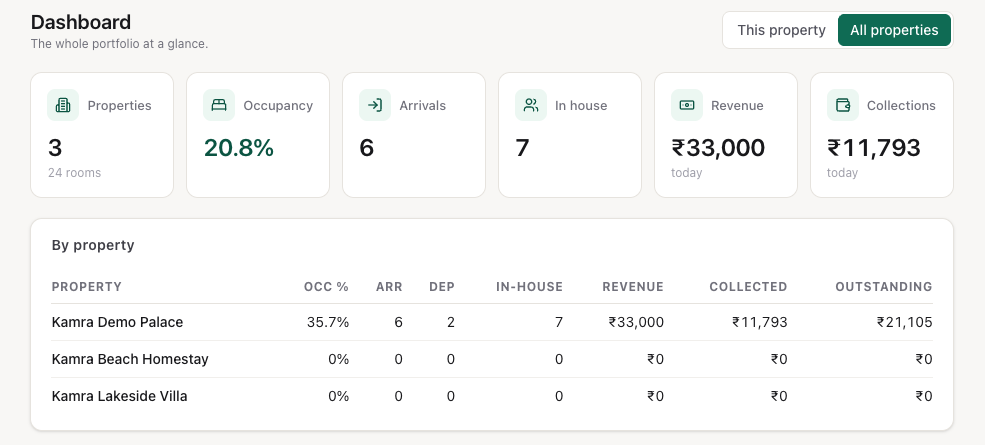
Open Finance → Reports. The Manager flash is the morning report for one date (pick it in the date box at the top right):
- Occupancy, ADR, RevPAR, RevPAX and Revenue (day) split into room, F&B and other. RevPAX is total guest spend (room, F&B, experiences, extras) per in-house guest.
- Last 14 days: Occ %, ADR, RevPAR and revenue per day, with the month-to-date total.
- Movement: arrivals, departures, in-house and no-shows.
- Collections: what was collected that day, by payment mode.
- Next 7 days: occupancy on the books for the coming week.
Press Print for a paper copy. Cashier shift report and Ledgers at the top open the cashier and ledger screens (see Billing). Finance and Hotel Admin users also get Voids & Allowances, the list of every void, allowance and cancelled invoice (see Billing).
The same flash is the first report in each night's audit pack.
Track the month against budget
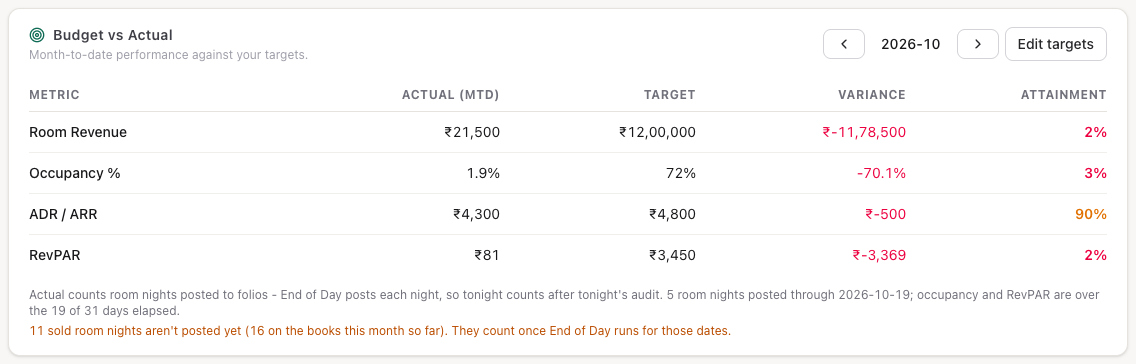
Open Revenue → Revenue Reports. Budget vs Actual compares the month to date with your targets: Room Revenue, Occupancy %, ADR / ARR and RevPAR, each with the variance and how much of the target you have reached.
"Actual" counts room nights posted to folios, and End of Day posts each night, so tonight counts after tonight's audit. Occupancy and RevPAR are worked out over the days of the month that have passed up to the business date, not the whole month, so they compare fairly with a monthly target. The note under the table says how many room nights are posted and over how many days. If sold nights are still waiting for End of Day, it says how many, in amber.
- Use the arrows to pick the month.
- Press Set targets (or Edit targets once the month has them).
- Type the targets in the Target column and press Save targets.
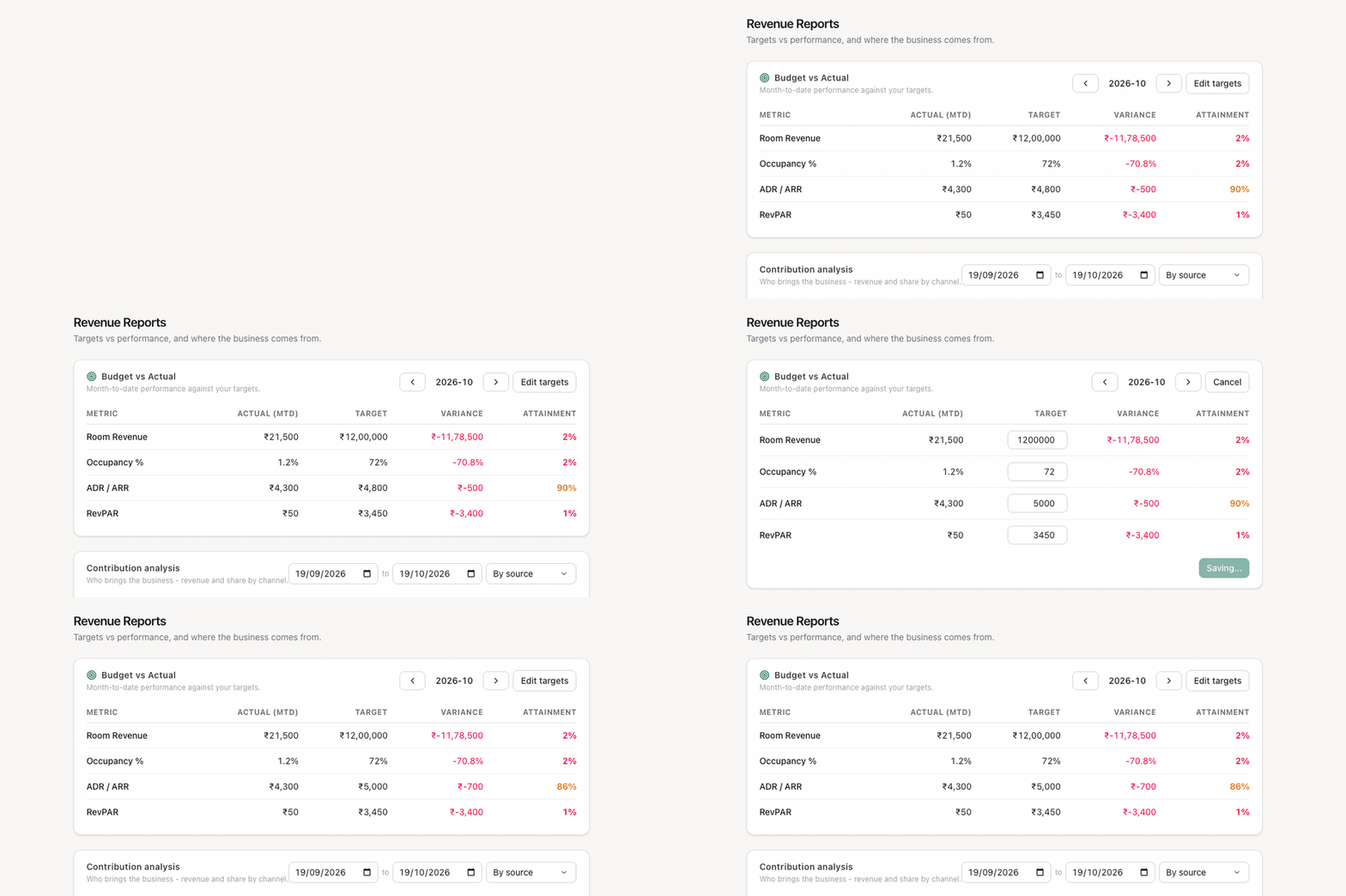
Revenue Manager, Finance and Hotel Admin users can save targets.
See where the business comes from
Contribution analysis on Revenue → Revenue Reports groups the bookings arriving in a date range By source, By company or By travel agent: bookings, room nights, revenue and share of the total.
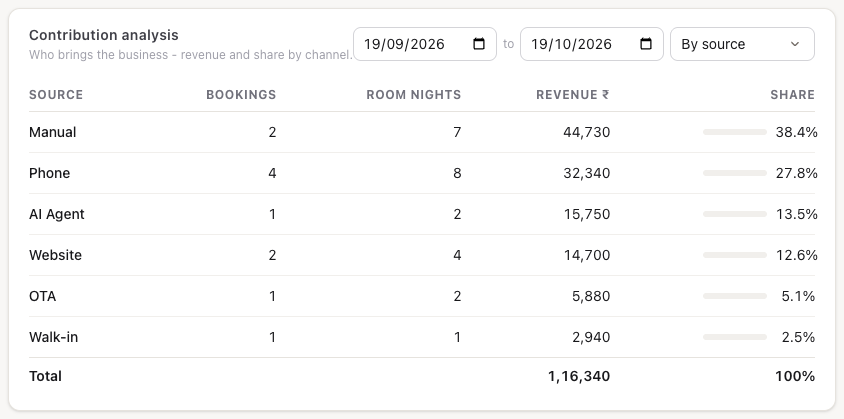
It counts confirmed, in-house and checked-out bookings by their arrival date, at the booking's total including tax. Bookings with no source, company or agent are shown as Direct.
Check guest-request response times
Open Operations → SLA Report. For guest requests created in the date range (the last 30 days by default) it shows the number of Tickets, how many are Resolved, the Breach rate and the average time to resolve, then the same by category and by priority, and Overdue now: open requests already past their due time, oldest first.
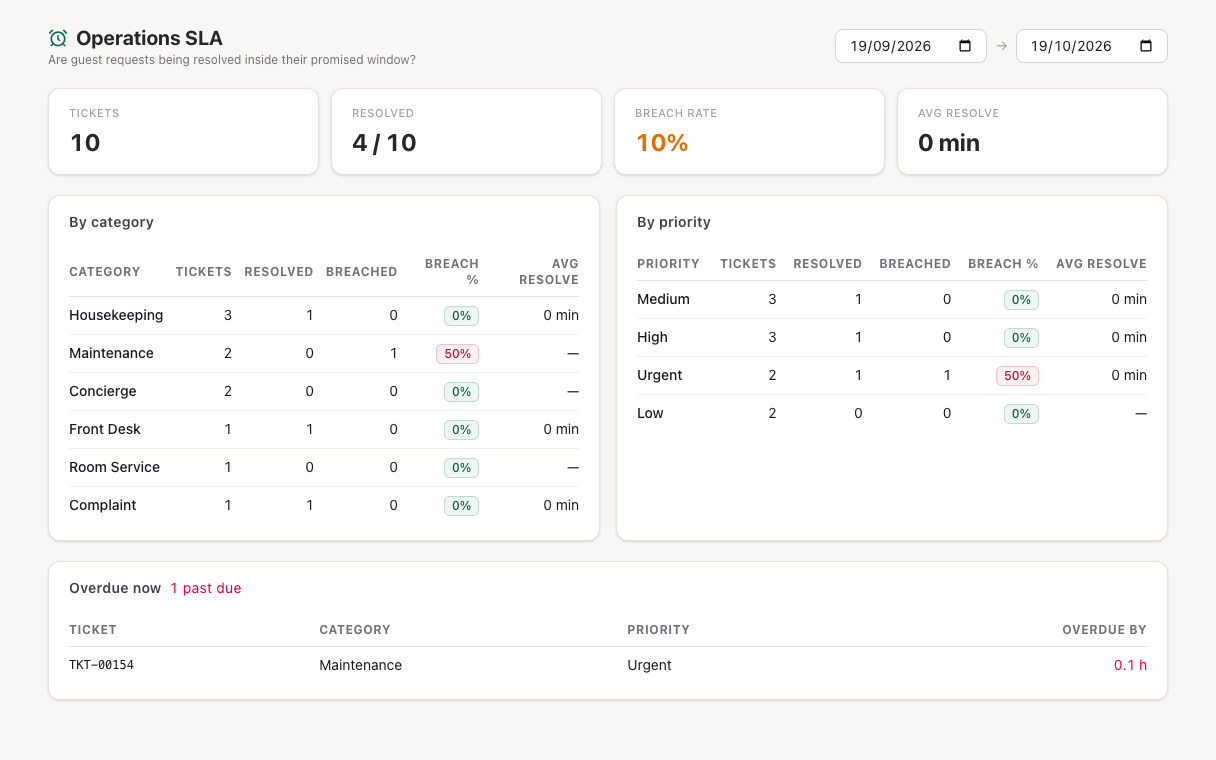
A request counts as breached when it was resolved after its due time, or is still open past it. Due times come from Settings → Operations; see Operations.
Send invoices to your accountant
Open Finance → Accounting Export (Finance and Hotel Admin).
- Pick the date range. It defaults to the last 30 days.
- Pick the format: Generic CSV, Tally, Zoho Books or ERPNext.
- Check the preview, then press Download CSV.
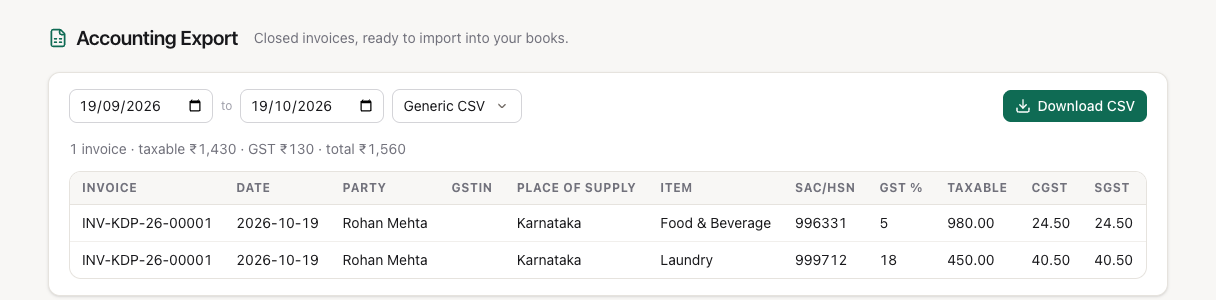
The export lists every invoice closed in the range: number, date, party and their tax ID, place of supply, taxable value, the tax split your country pack uses (CGST and SGST in India, a single tax column elsewhere) and the total. How the rows are laid out depends on the format:
- Generic CSV and Zoho Books give one row per service code and tax rate on each invoice, so a bill with a room, a dinner and laundry has a row for each. Generic CSV adds Item, SAC/HSN, the tax %, Line Total and Invoice Total columns; Zoho Books uses its own Item Name, HSN/SAC, Item Tax % and Item Total.
- Tally and ERPNext give one row per invoice.
The preview shows the first 12 rows; the download has them all.
Good to know
- Dashboards and the flash use the calendar date, not the hotel's business date. Between midnight and the night audit, "today" on the dashboard is already the new day.
- Occupancy counts rooms with a room night posted, not rooms with a guest in them.
- Contribution revenue is the booking value, not what was posted on the folio; use budget vs actual or the flash for posted revenue.
- The audit pack keeps each night's reports as they were, so a reprint of a past day matches the original.
Troubleshooting
Occupancy and room revenue show 0 for today. Tonight's night audit hasn't run yet. Earlier days are on the flash's 14-day table.
All properties is missing on the dashboard. You have access to only one property.
The accounting export is empty. It lists closed invoices only. Folios still open (guests in house) are not in it.
For developers
The numbers come from kamra.dashboards.property_dashboard and portfolio_dashboard, and kamra.reports.manager_flash, budget_vs_actual, save_budget, contribution and sla_report; the export is kamra.accounting.export_invoices. Finance and Hotel Admin can also pull every void, allowance and invoice cancellation with kamra.reports.void_allowance_report, the endpoint behind the Voids & Allowances screen. See Dashboards and Reports in the API reference. Agents get the daily picture from the owner_briefing and position_briefing MCP tools.