
Night audit - End of Day
The night audit closes the hotel's business date. It posts the night's room charges for every in-house guest, applies the no-show policy, saves an audit pack of the day's reports and moves the business date on by one day. You can run it by hand from the End of Day checklist, and it runs on its own at 03:00. Front Desk, Finance, Night Auditor and Hotel Admin users can run it.
Before you start
- Check the no-show rules. Settings → Front Desk → Night audit & no-shows decides when an arrival that never came becomes a No Show; the fee is Settings → Stay policies → No-show charge. See Settings.
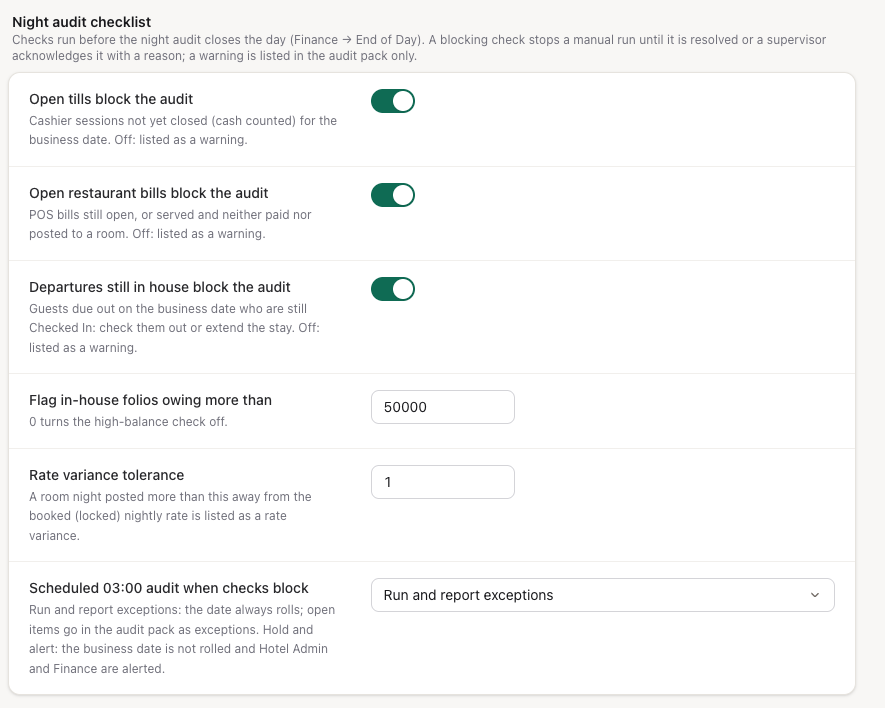
- Decide what blocks the audit. Settings → Front Desk → Night audit checklist sets which checks stop a manual run, the high-balance threshold and what the 03:00 run does when something is still open.
- Give your night auditor the Night Auditor role if they don't have Front Desk or Finance: Settings → Staff & access. It can run End of Day and acknowledge blockers, check guests in and out, close cashier sessions, and view folios, the cashier summary and reports.
Open End of Day
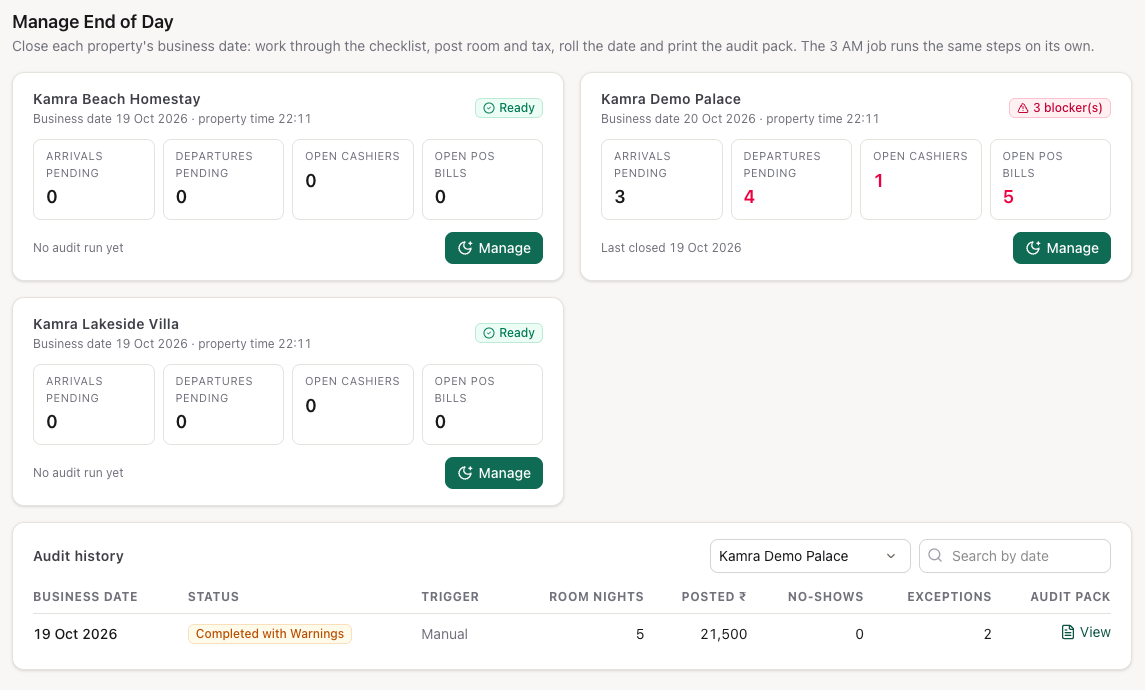
Open Finance → End of Day (also under Front Desk, or type night audit, end of day or EOD in search, Ctrl/Cmd+K). Manage End of Day shows one card per property: its business date and local time, arrivals and departures still pending, open cashiers, open POS bills, and Ready or the number of blockers.
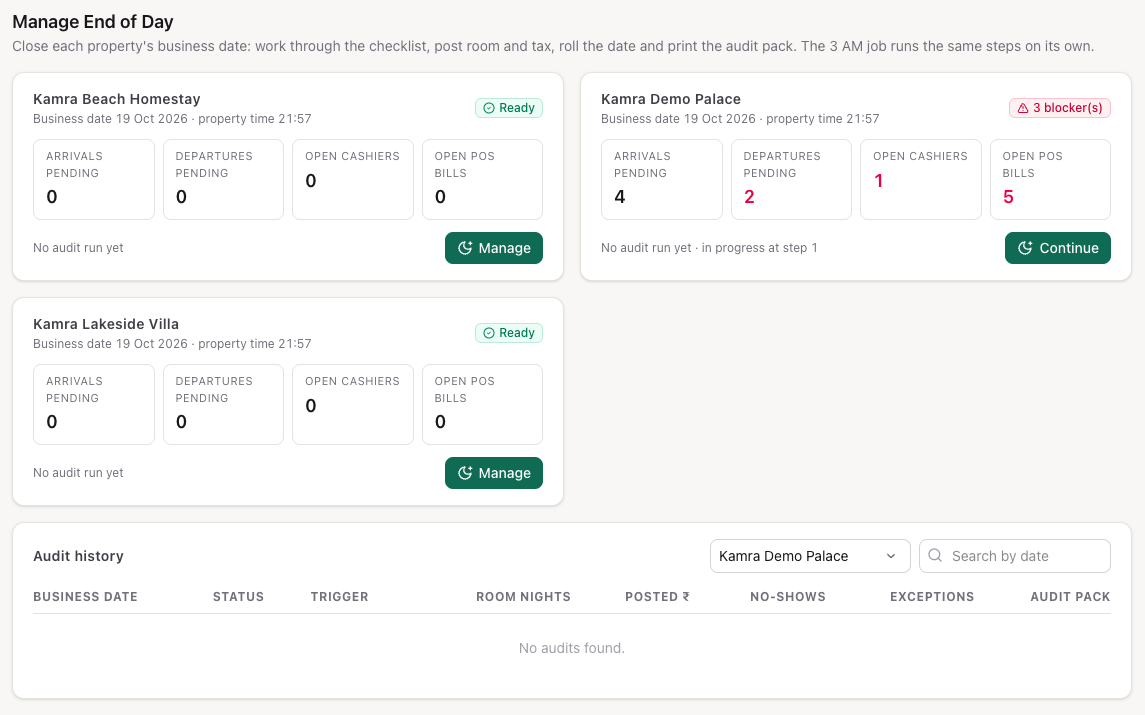
Press Manage on the property (it reads Continue if you already started tonight). Your progress is saved as you go, so you can leave and come back to the same step.
Work through the checklist
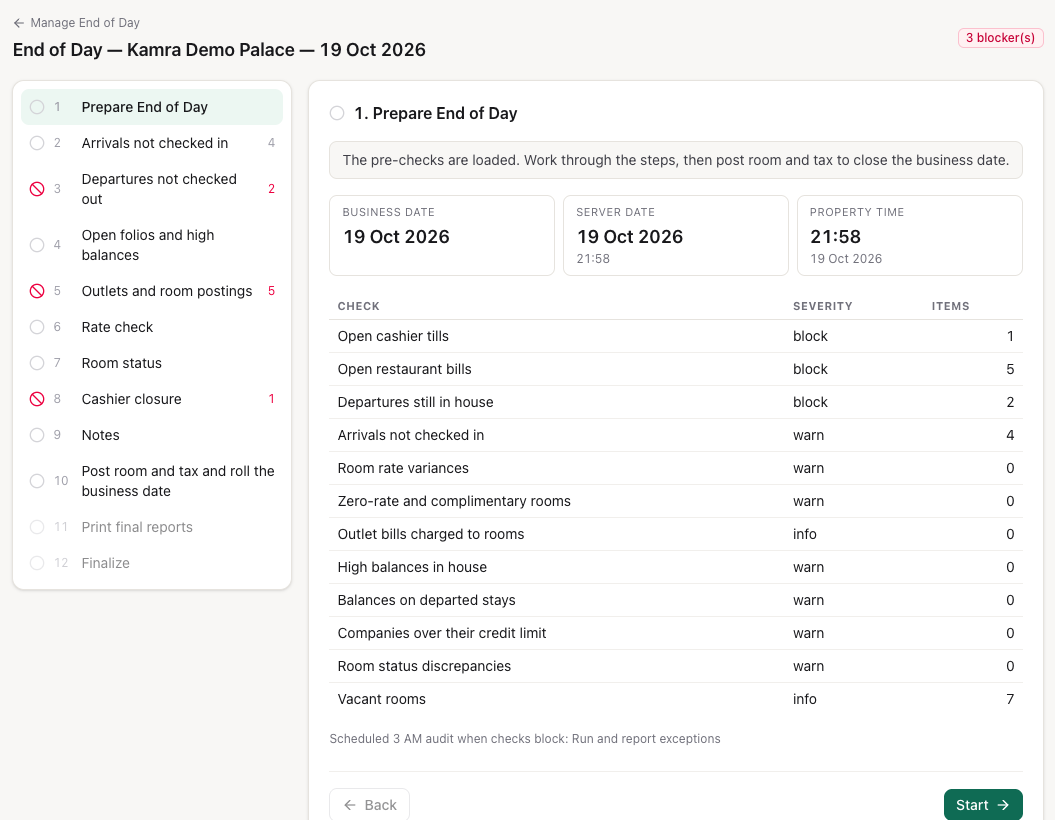
The steps are listed on the left, each with a status (pending, done, blocked, skipped) and the number of items it found. Step 1 shows the business date, the server date and the property's time side by side, and every check with its severity. Press Start, then Continue after each step.
| # | Step | What you do |
|---|---|---|
| 1 | Prepare End of Day | Read the pre-checks. |
| 2 | Arrivals not checked in | Check in, Mark no-show, or Continue. Each row shows what the no-show policy will do with it. |
| 3 | Departures not checked out | Check out, Extend stay, or Quick check out every zero-balance departure at once. Blocks by default. |
| 4 | Open folios and high balances | In-house folios owing more than the threshold, balances left on departed stays, companies over their credit limit. |
| 5 | Outlets and room postings | Open restaurant bills (blocks by default), and every outlet bill posted to a room today, so a wrong-room posting stands out. |
| 6 | Rate check | Room nights posted away from the booked rate, and zero-rate or complimentary rooms. |
| 7 | Room status | Rooms where the front office and the room board disagree, and vacant rooms. |
| 8 | Cashier closure | Count each open till and Close session. Blocks by default. |
| 9 | Notes | Notes for the manager (weather, incidents). They print on the audit pack. |
| 10 | Post room and tax and roll the business date | Runs the audit. |
| 11 | Print final reports | The audit pack. |
| 12 | Finalize | Summary. |
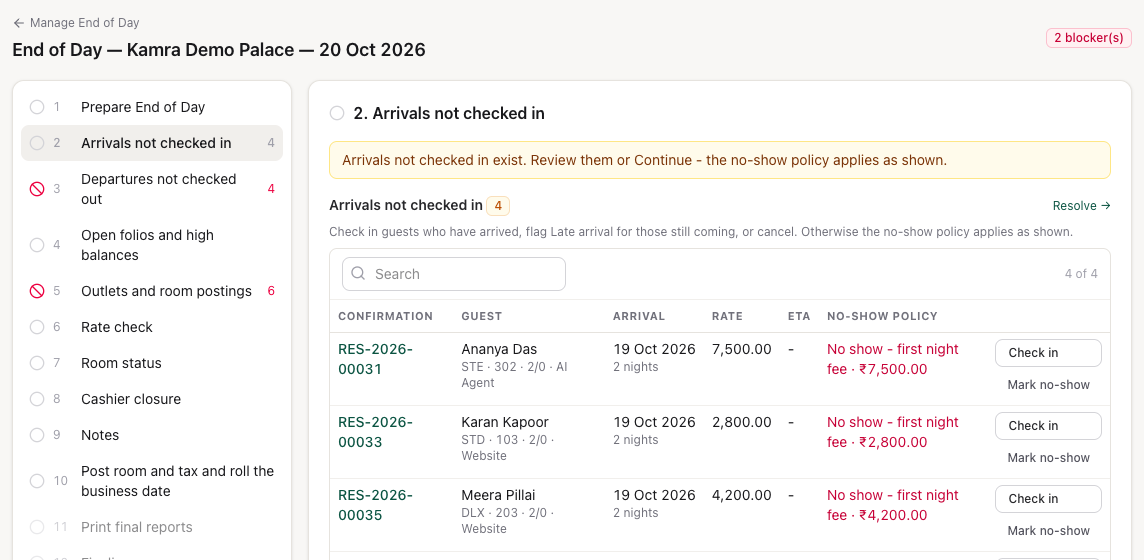
Mark no-show applies the property's policy straight away: the stay becomes a No Show and the fee is posted on the business date, or waived for an OTA booking. Only a Confirmed arrival due on or before the business date can be marked.
Clear or acknowledge a blocker
Three checks block the audit by default: open tills, open restaurant bills, and guests due out who are still checked in. A blocked step shows a red sign and has no Continue button. Either fix it (check the guest out, settle the restaurant bill, close the till), or acknowledge it:
- Type the reason in the box under the list, for example "Late checkouts approved by the duty manager".
- Press Acknowledge.
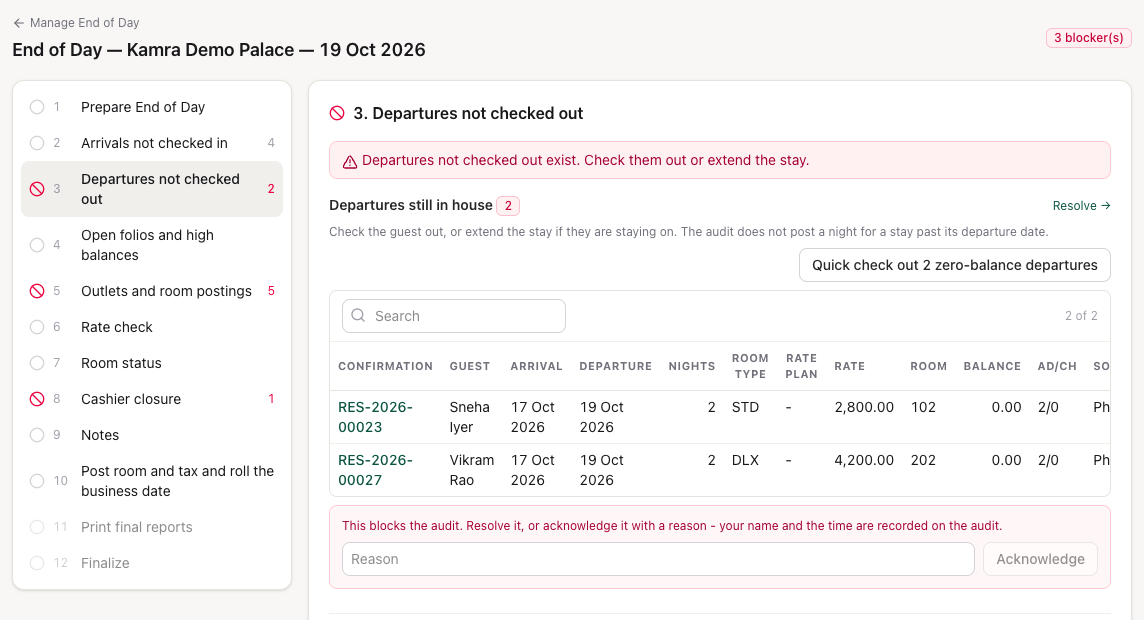
Your name, the time and the reason are saved on the audit, printed in the pack and written to the Activity log. Warning checks never block: they are listed and you press Continue.
Close the tills
Step 8 lists every till still open for the business date with its float, transactions and cash taken. Type the counted cash on a row and press Close session; Expected vs counted below shows each session's variance.
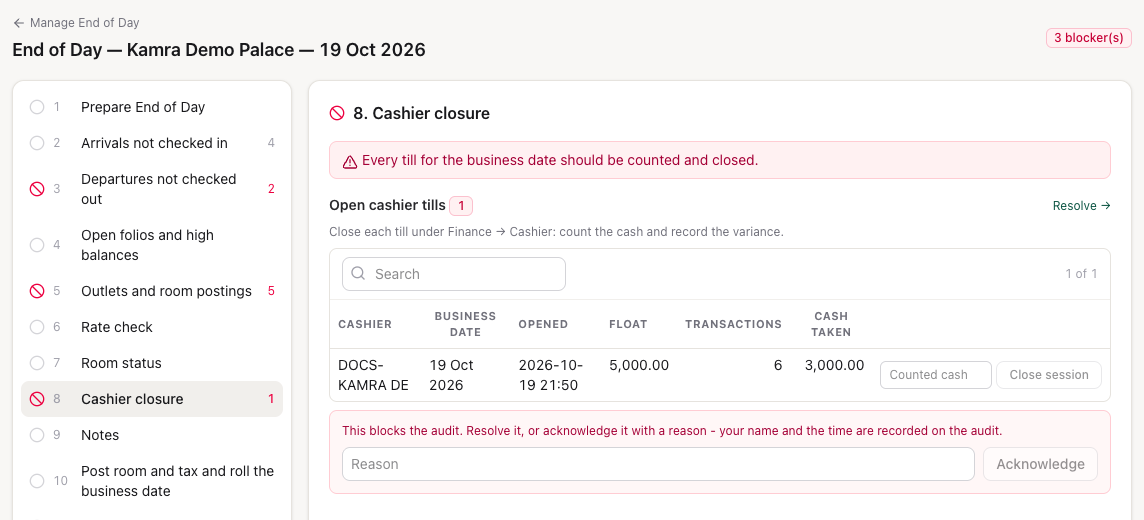
A cashier can also close their own till on Finance → My Till: see Billing.
Run the audit
- Go to step 10, Post room and tax and roll the business date. If a blocking step is still open, the step names it and the button stays off.
- Press Post room and tax and roll the business date.
- Kamra posts the night and shows what it did: room nights posted and their amount, no-shows, and the new business date.
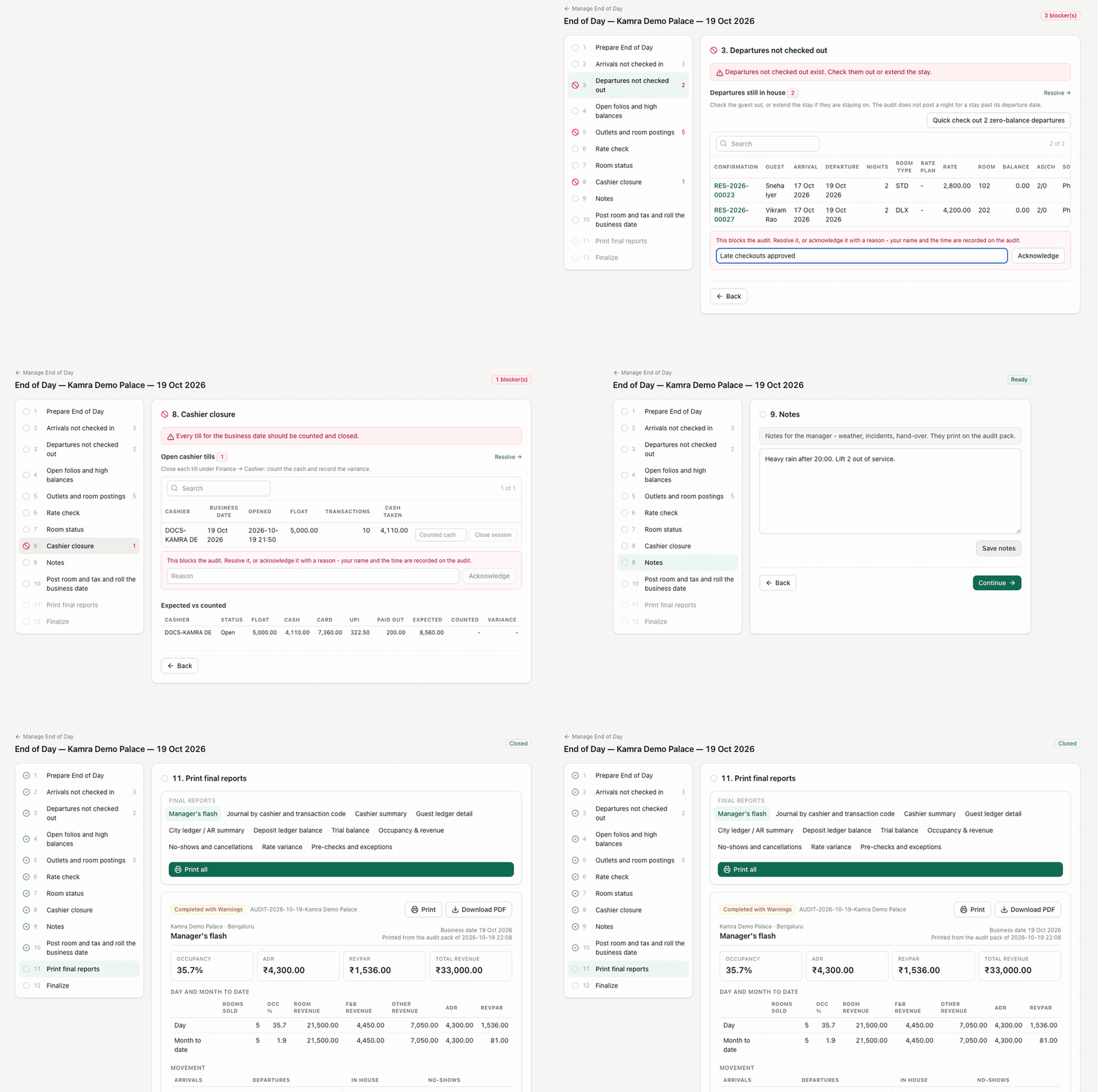
It cannot be undone. The audit closes only the property's current business date, and only once that day has started on the server: you can't run tomorrow's audit tonight.
What the audit posts
For every guest checked in on the business date:
- one Room night at the rate confirmed at booking for that night (season, demand pricing and rate plan included), routed to the company folio when the company pays the room;
- the Meal Plan for the night, if the stay has one;
- the Room levy (city or tourism tax), if the property has one;
- an Extra Guests charge, if the stay has one agreed.
Nights already on the folio are skipped, so running it again, or a checkout that already posted the night, never charges twice. A missing guest folio is opened.
For arrivals that never came, the no-show policy applies: the stay becomes No Show and the No-show charge (first night or full stay) is posted on the date being closed, unless the arrival is held as a late arrival or the fee is waived for an OTA booking.
The audit also removes waitlist entries two days past their requested departure.
Print the audit pack
Step 11 lists the final reports on the left. Pick one to read it, then Print or Download PDF (choose Save as PDF in the print dialog); Print all prints the whole pack on A4:
- Manager's flash
- Journal by cashier and transaction code
- Cashier summary
- Guest ledger detail
- City ledger / AR summary
- Deposit ledger balance
- Trial balance, whose total line says whether the ledgers match the folios: Agrees with folios or Differs from folios by an amount
- Occupancy & revenue (Occ %, ADR, RevPAR)
- No-shows and cancellations
- Rate variance
- Pre-checks and exceptions, with every acknowledgement
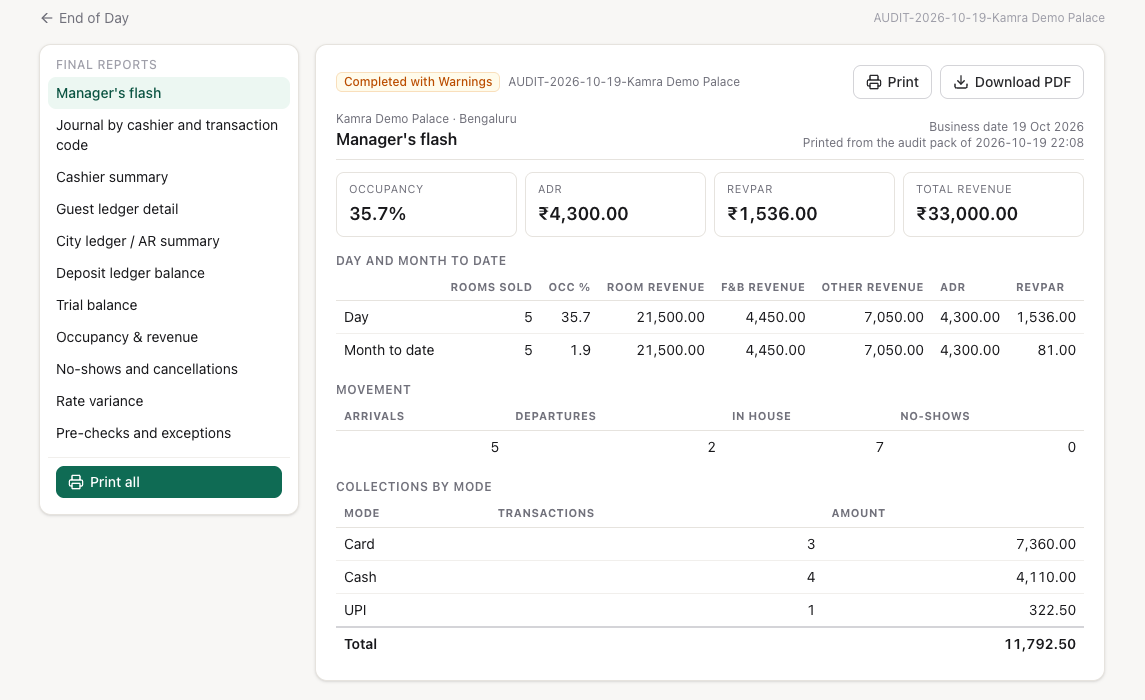
The pack is saved on the audit when it runs, so reprinting a past night gives exactly what was printed that night. Find past audits in Audit history at the bottom of Manage End of Day: search by date and press View in the Audit pack column. Audits from before packs existed show No pack.
The 03:00 run
Every night at 03:00 Kamra runs the audit for each property whose business date is still behind the calendar date. It does the same work as the manual run. If a blocking check is still open, it follows Scheduled 03:00 audit when checks block:
- Run and report exceptions (default): the date rolls, and the open items are recorded as exceptions in the pack.
- Hold and alert: the business date stays where it is, and Hotel Admin and Finance users get an in-app notification and an email.
If someone already closed the day by hand, the 03:00 run skips it.
Settings
| Setting | Where | Default | What it does |
|---|---|---|---|
| Open tills block the audit | Settings → Front Desk → Night audit checklist | On | Off lists open cashier sessions as a warning. |
| Open restaurant bills block the audit | Settings → Front Desk → Night audit checklist | On | Off lists them as a warning. |
| Departures still in house block the audit | Settings → Front Desk → Night audit checklist | On | Off lists them as a warning. |
| Flag in-house folios owing more than | Settings → Front Desk → Night audit checklist | 50000 | 0 turns the high-balance check off. |
| Rate variance tolerance | Settings → Front Desk → Night audit checklist | 1 | How far (in currency units) a posted room night may be from the booked rate before it is listed. |
| Scheduled 03:00 audit when checks block | Settings → Front Desk → Night audit checklist | Run and report exceptions | Or Hold and alert. |
| Mark no-shows | Settings → Front Desk → Night audit & no-shows | At audit for arrival date | One day later keeps the arrival Due In until the next day's audit. |
| Hold late arrivals until the next audit | Settings → Front Desk → Night audit & no-shows | On | An arrival due on the day being closed stays Due In if it is flagged Late arrival or its ETA is later than the moment the audit runs. An ETA before 06:00 counts as after midnight. |
| No no-show fee on OTA bookings | Settings → Front Desk → Night audit & no-shows | On | OTA bookings are still marked No Show, but no fee is posted. |
| Release non-guaranteed arrivals at | Settings → Front Desk → Night audit & no-shows | Blank (off) | At this time, today's arrivals with no advance, payment or deposit, and not from an OTA or a company, are cancelled with no fee. |
| No-show charge | Settings → Stay policies → Cancellation & no-show | First Night | None, First Night or Full Stay. |
Good to know
- Anyone who can run End of Day can acknowledge a blocker. The check is on the role (Front Desk, Finance, Night Auditor, Hotel Admin), and the name and reason are recorded.
- Room nights bill the rate confirmed at booking. A later rate change or a new season never changes a confirmed stay.
- The audit never posts a night past the departure date. A guest who is still in house after their departure date gets no night until you extend the stay.
- Dashboards and reports count posted room nights, so today's occupancy and room revenue show once the audit has run.
Troubleshooting
"Night audit is blocked: …" A blocking check still has items. Resolve them, or acknowledge each one with a reason in its step.
"Business date … is already ahead of today." Today's audit has already run. The next one can run once the next calendar day has started.
"Night audit can only close the current business date." The audit closes one date at a time, the one shown on the card.
The 03:00 run didn't roll the date. The property is set to Hold and alert and something was blocking. Check the alert, clear the items and run End of Day by hand.
For developers
Agents run the same checklist with the night_audit_precheck MCP tool and the audit with run_night_audit (blockers are acknowledged with a note): see MCP tools. The wizard's endpoints (kamra.night_audit.eod_session, eod_progress, eod_acknowledge, eod_mark_no_show, eod_overview, night_audit_pack, night_audit_history) are in the API reference.