
Billing - folios, payments and the cashier
Every stay has a folio: the running bill where room nights, restaurant bills and extras land, and where payments are recorded against them. This page covers the folio, the cashier's till, deposits, invoices, company accounts and the ledgers. Front Desk and Finance staff work here; credit notes, company payments and the accounting export are for Finance and Hotel Admin.
Amounts, tax rates and payment modes on this page come from the sample hotel in India. Yours come from your country pack: see Country setup.
Before you start
- Open your till. Payments, refunds and invoices are refused until you have an open cashier session: see Open and close your till.
- Decide on a cashier PIN. Settings → Finance → Cashier controls → Require cashier PIN on money actions. When it's on, each person sets a PIN the first time they take money, and money actions ask for it again after the unlock window runs out. It's off by default.
- Connect a payment gateway if you want to send payment links: Settings → Payments. The gateways on offer depend on your country pack.
- Set corporate billing if you have credit companies: Settings → Finance → Corporate billing (see Company folios).
Find a folio
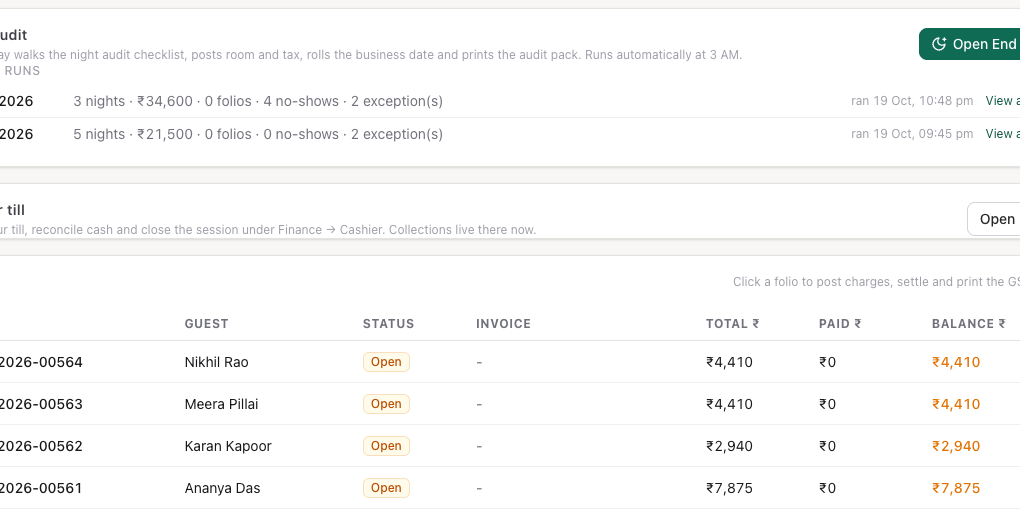
Open Finance → Billing. The Folios list shows every folio for the property, newest first, with its status, invoice number, total, paid and balance. Click a row to open the folio. You can also reach a stay's folio from the reservation.
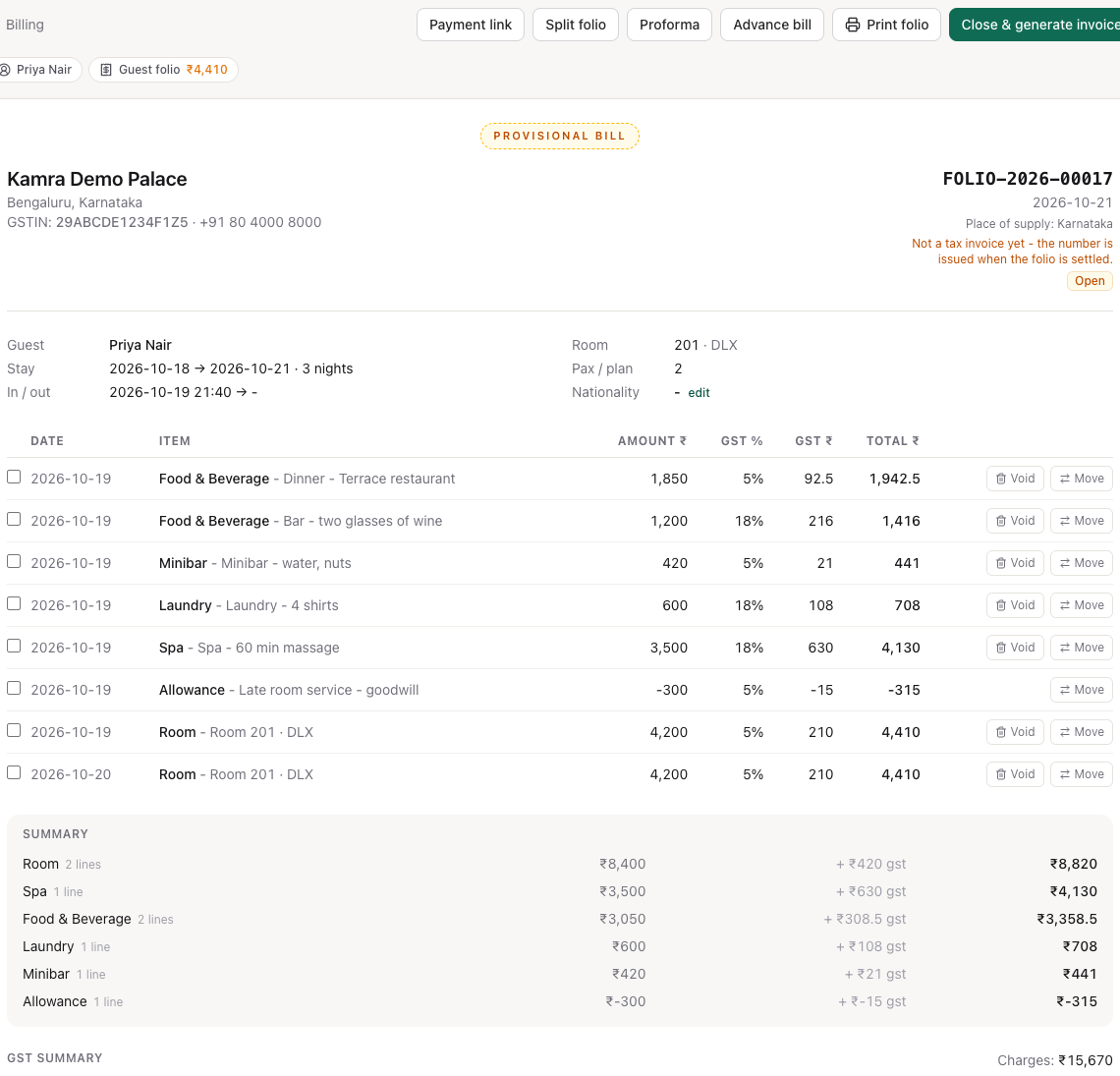
A folio opens by itself at check-in. Until it is settled it is a Provisional Bill with no invoice number.
Post a charge
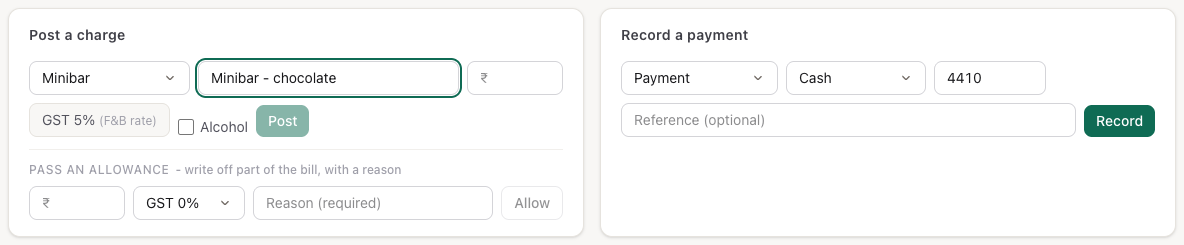
- Open the folio and scroll to Post a charge.
- Pick the charge type (Food & Beverage, Minibar, Laundry, Spa, Early Check-in, Late Checkout, Pet Charge, Discount or Misc).
- Type a description and the amount before tax.
- Pick the tax rate. For food, drink and minibar charges there is no choice: the form shows the F&B rate from your country pack, for example GST 5% (F&B rate). Tick Alcohol for drinks with alcohol; they take a rate you pick. The tax name (GST, VAT…) follows your country pack.
- Press Post.
Room nights, meal plans and room levies are not posted by hand: the night audit posts them every night. Restaurant bills charged to a room arrive from the POS.
Take a payment
- Open the folio and scroll to Record a payment.
- Pick what the money is:
- Payment: against the bill.
- Advance: taken before or at check-in. It pays the stay.
- Security Deposit: held and refundable, not revenue. See Security deposits.
- Pick the mode (cash, card and the other modes your country pack lists). The amount is filled in with the balance; change it for a part payment.
- Add a reference (card slip, transfer number) if you have one.
- Press Record. The balance at the foot of the bill updates.

Every payment also goes into your till session, so the shift report and the ledgers include it.
Send a payment link instead. When the folio has a balance and a gateway is connected, Payment link in the action bar creates a link for the balance and copies it, ready to paste to the guest (or the booker, if the booking says to contact the booker). When the guest pays, the payment posts to the folio by itself.
Refund money. At check-out you don't need this: the check-out sheet's Payment step works out the refund, suggests the mode the money came in by, and sends a held security deposit back through the deposit's own refund (see Front desk). For any other refund, under the payments list, Refund money (deposit return / over-collection) opens a refund row: amount, mode and a reason, then Refund. You can't refund more than was collected on the folio, and a closed folio can't be refunded. Every refund is written to the activity log with your name.
Correct a charge
Void removes a wrong line (wrong amount, duplicate, wrong guest):
- On the charge line, press Void.
- Type the reason. It is required and goes on the record.
- Press Confirm void.

Pass an allowance when the charge was right but you are giving money back (service recovery, a dispute): under Post a charge, fill in the Pass an allowance row with the amount, the tax rate of the charge it offsets and a reason, then press Allow. The original line stays on the bill and the allowance shows as a minus line, so the trail stays honest.
Voids work only on an open folio. Once the folio is invoiced, use a credit note instead.
Split or move charges to another folio
A stay can have more than one folio: the Guest folio, a Company folio, Extra folios and, for groups, a Group folio. They show as tabs above the bill, each with its balance.
- Tick the lines to move, or press Move on a line.
- To move only part of a single line, type a percent (
30%) or an amount before tax (1500) in the box next to move only. - Under Send … to, pick the folio, or + New Company folio / + New Extra folio to create one and move the lines into it.
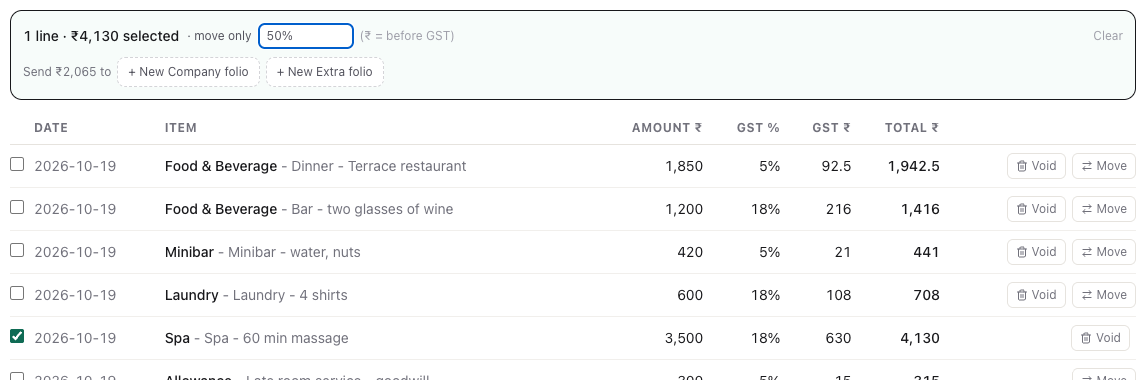
Split folio in the action bar adds an empty folio to the stay (a Company folio first, then Extra folios). An empty Company or Extra folio can be deleted with the × on its tab.
Bill a company
When a stay is booked for a company, Kamra routes each charge to the right folio as it is posted:
- A company's own billing rules decide which charge types it pays (set them on the company under Revenue → Companies, where Credit allowed (city ledger) is also ticked).
- A credit company with no rules uses Settings → Finance → Corporate billing. The default, Room and F&B (liquor to guest), bills the room night, its meal plan, levies, early check-in / late checkout, cleaning fee and food to the company; laundry, minibar, spa and misc stay with the guest. Nothing (guest pays unless rules say so) turns the default off.
- Alcohol never goes to a Company or Group folio. Kamra refuses to post or move it there.
At checkout, the guest settles their own folio. Whatever the company owes moves to its city ledger account by itself, if the company is allowed credit.
Record a company's payment (Finance and Hotel Admin):
- Open Finance → Ledgers. City ledger aging lists each company's balance by age (0-30, 31-60, 61-90, 90+ days) and any unapplied credit.
- Press Record payment on the company's row.
- Enter Amount received, the Mode and the Reference (UTR / cheque no.). By default the payment clears the oldest bills first; you can type the amount for each bill instead.
- Press Review payment, check what it clears, then Confirm.
Money left over stays on the account as unapplied credit and pays the company's next bill automatically.
Take and return a security deposit
A refundable damage deposit (villas, long stays) is held for the guest, not counted as revenue. The Security deposit panel is in the reservation drawer of an upcoming or in-house stay. The amount the property expects is set in Settings → Stay policies → Deposits → Security deposit (0 means none is asked for).
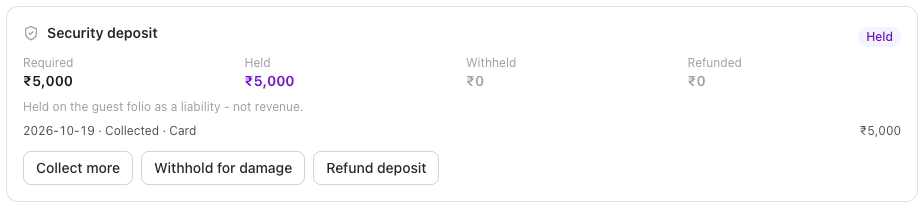
- Collect deposit: amount, payment mode and an optional card slip or transfer reference. It goes through the till like any payment.
- Waive deposit: no money taken; a reason is required.
- Withhold for damage: posts a damage charge to the folio with your reason; the held deposit pays it.
- Refund deposit: returns what is still held, before check-out.
A deposit taken from the folio's Record a payment form (kind Security Deposit) shows up in the same panel.
Booking deposits (an advance before arrival) are taken from the Deposit panel on the booking: see Reservations.
Close the folio and print the invoice
- Make sure the balance is zero: collect what is owed, refund an overpayment, or let the company's share go to the city ledger.
- Press Close & generate invoice. Kamra assigns the next invoice number from the property's series and the bill becomes a Tax Invoice.
- Press Print invoice, or choose Save as PDF in the print dialog.
The invoice's title, tax lines and wording come from the country pack. In Saudi Arabia a settled bill prints as a Simplified Tax Invoice with the ZATCA QR code; set up the seller details once under Settings → ZATCA e-invoicing (Country setup).
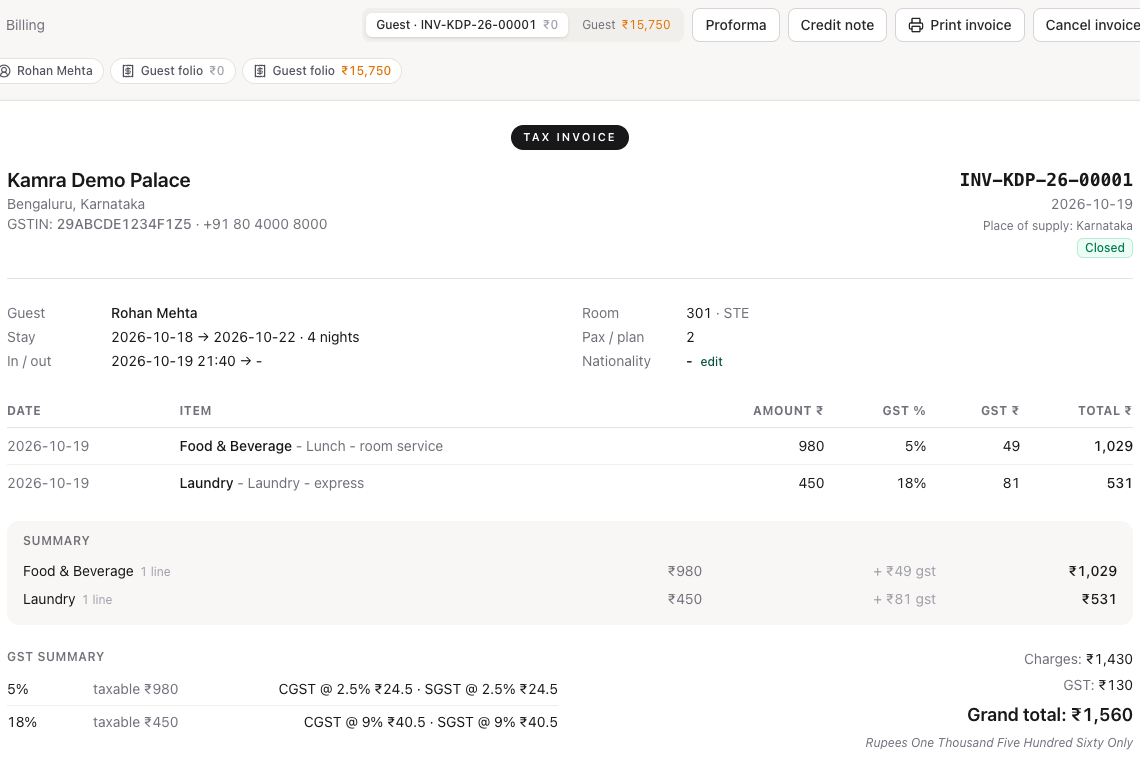
Other buttons in the action bar:
- Print folio prints the provisional bill of an open folio.
- Proforma saves a proforma copy of the bill as it stands and prints it.
- Advance bill posts the remaining room nights of the stay now, ahead of the night audit (for a guest who wants to pay everything up front).
- Settle & continue stay appears when an open folio is fully paid. It issues an interim invoice for what is on it and opens a fresh folio for the rest of the stay: the long-stay pattern of settling every few days. The settled folio's tab then shows Guest · followed by its invoice number; the new folio's tab is Guest.
- Group folio (group stays) opens one consolidated company bill for every room of the group.
Cancel an invoice or issue a credit note
Cancel invoice (on a closed folio): type the reason and press Confirm cancel. The invoice number goes on the cancelled-invoice register, the old bill stays printable, and the folio reopens so you can correct it and close it again under a new number. Where the country does not allow cancelling (Saudi Arabia), the pack issues a credit note instead.
Credit note (Finance and Hotel Admin, on an invoiced folio): enter the amount and the reason. Kamra numbers the credit note against the original invoice. On a company stay that has already moved to the city ledger, the credit reduces the company's balance.
Open and close your till
Each cashier has one till session per business date.
- Open Finance → My Till.
- Enter the Opening float (the cash in the drawer) and press Open session.
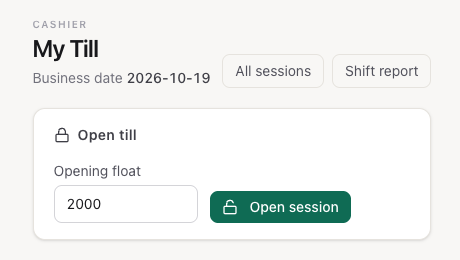
While the session is open, My Till shows the float, cash, card and other takings, paid-outs, drops, petty cash and the Expected cash in the drawer, with the session's recent transactions below.
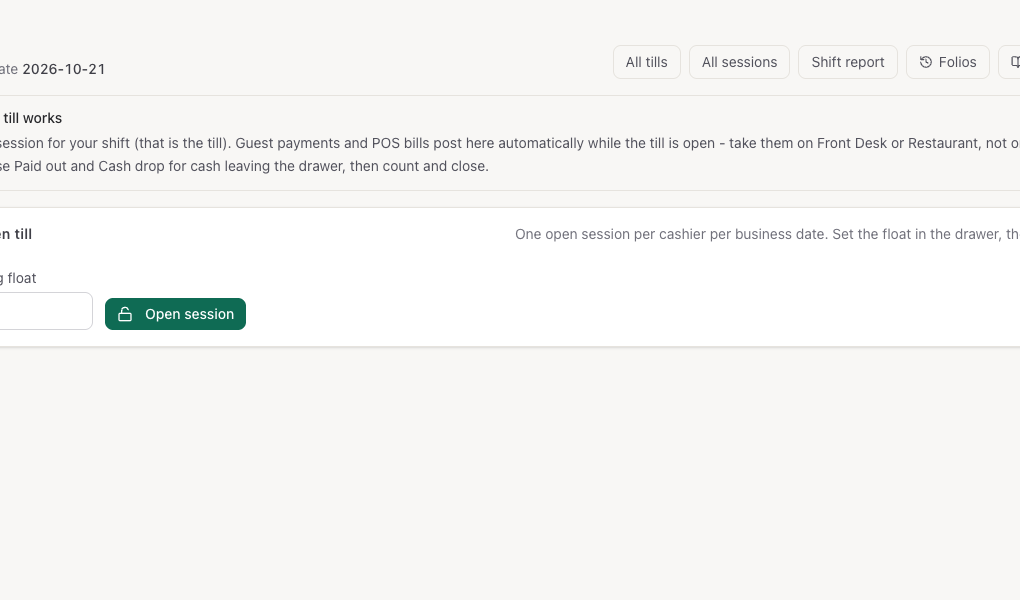
- Paid out: cash leaving the drawer for a guest or vendor. Amount and reason, then Post.
- Cash drop: move cash to the safe. Amount, then Drop to safe.
Count the drawer and close the till
- In Close till, type the cash you counted. Kamra shows the Variance against the expected cash as you type.
- Press Close session.
Finance and the night auditor can also close someone else's till, in the Cashier closure step of End of Day. Finance → Sessions lists every session with its float, expected and counted cash and variance.
Shift Report (Finance → Shift Report) lists every session of a business date with its cash, card and variance, and a journal of the day's transactions by kind and mode.
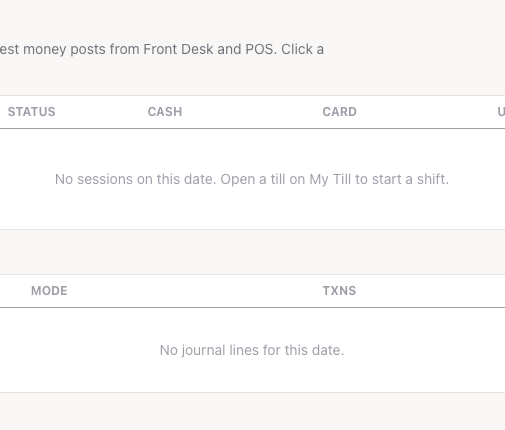
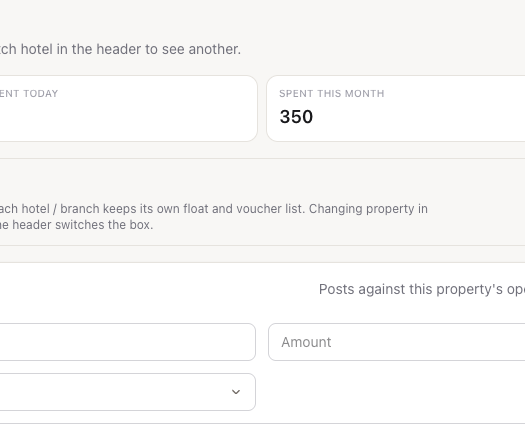
Pay small expenses from petty cash
- Open Finance → Petty Cash (or Petty cash → on My Till).
- Fill in the Payee, Amount, a category (Supplies, Maintenance, Transport, Staff Welfare, Miscellaneous) and the Reason.
- Press Post voucher. The cash comes out of your open till.
Change foreign currency
- Open Finance → Currency Desk.
- Pick the currency and the direction: Buy (guest sells FX) or Sell (guest buys FX), and the foreign amount.
- Press Calculate to see the rate and the local amount, then Post exchange. The local cash goes through your till.
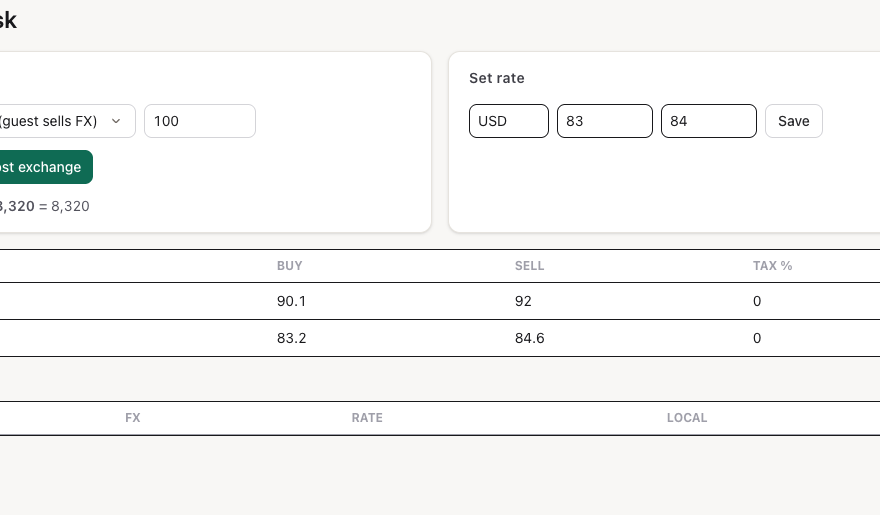
Finance and Hotel Admin set the buy and sell rates in Set rate (currency, buy, sell, then Save).
Check the ledgers
Finance → Ledgers shows the four folio ledgers for a date: Guest (what in-house guests owe), Deposit (advances and security deposits held), AR (what companies owe) and Package. Below them are the journal by transaction code and the city ledger aging.
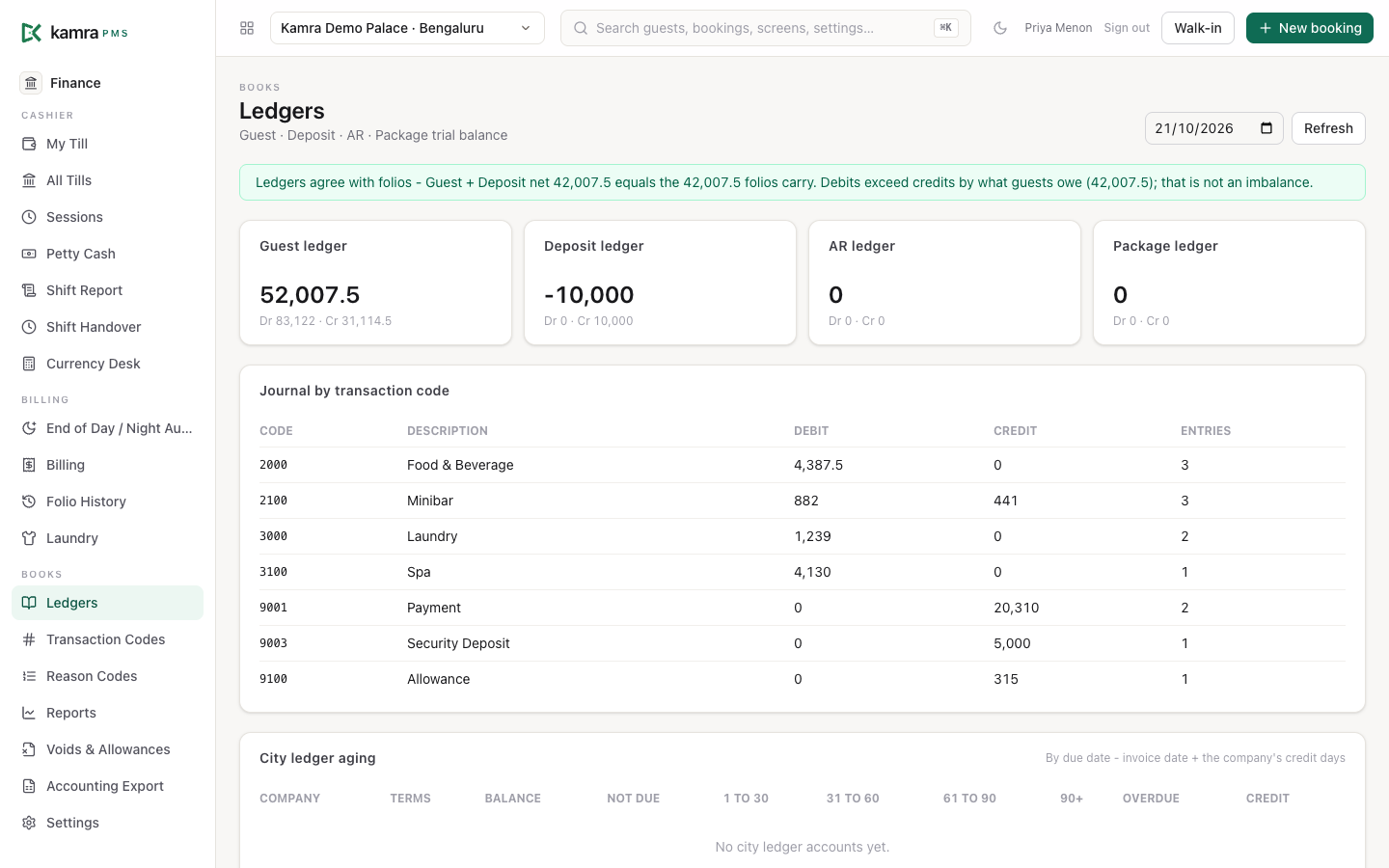
The banner at the top checks the ledgers against the folios for the current business date. Ledgers agree with folios means the Guest and Deposit ledgers add up to what the folios carry. Debits are higher than credits by what guests owe; that is expected. If a folio doesn't match, the banner turns amber and lists it (see Troubleshooting). For any other date it shows the totals only.
Every charge, payment, void, transfer and allowance writes a ledger entry. A void or a move does not delete history: it posts a reversal.
Transaction codes and reason codes
Finance → Transaction Codes is the chart of folio charge and payment codes (revenue group, default tax, alcohol flag). Blank property means every property. Kamra seeds defaults; add a code only when your books need it. Disable instead of deleting when the journal already used it.
Finance → Reason Codes holds coded reasons for voids, refunds, allowances, rate changes and paid-outs. Defaults ship with Kamra; add property-specific codes here. A code marked Requires supervisor needs Finance or Hotel Admin when used.
Both screens are also linked from Settings → Finance.
Review voids and allowances
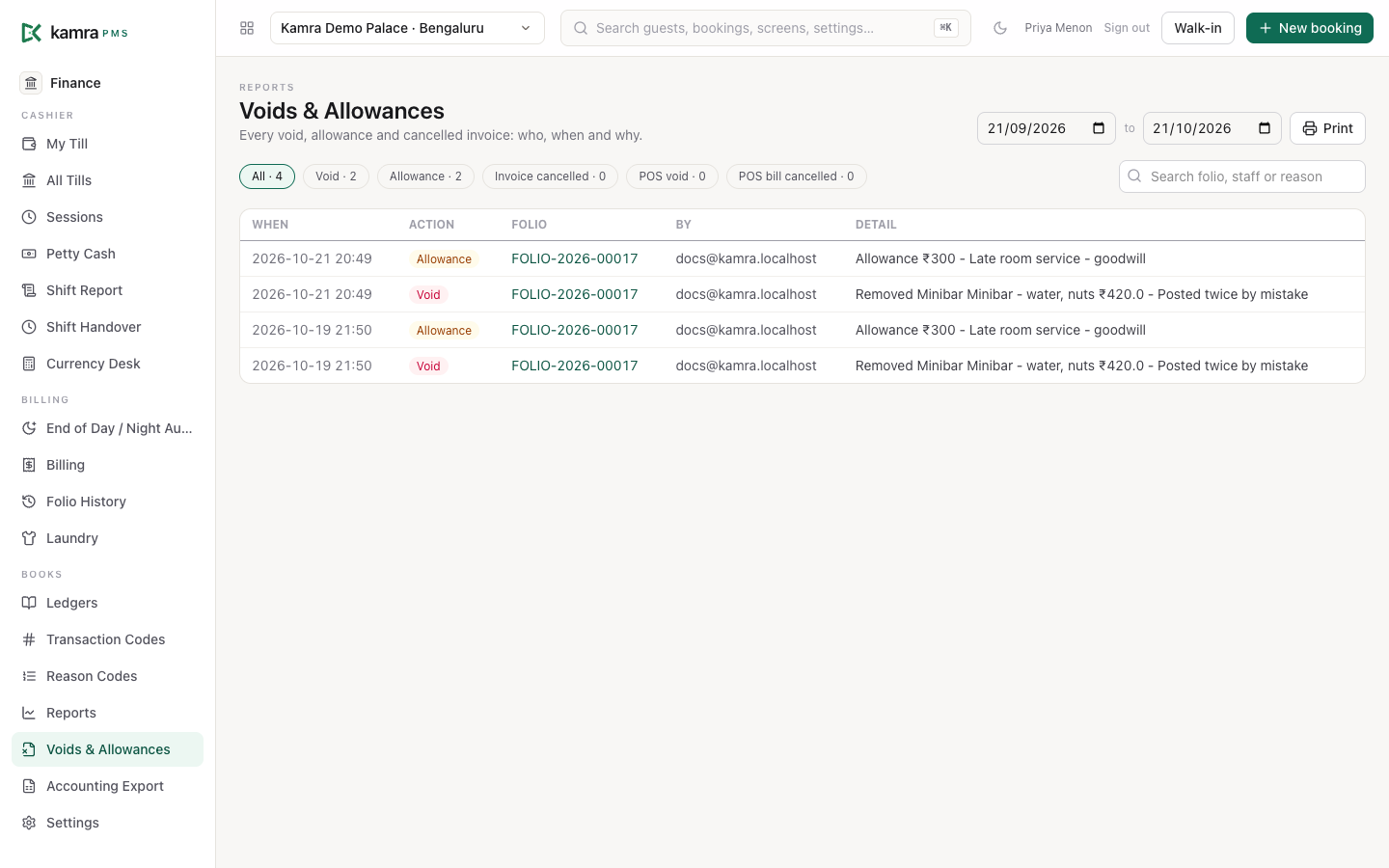
Finance → Voids & Allowances (also linked from Finance → Reports) lists every void, allowance and cancelled invoice on the property: when, which folio, who did it and the reason. Finance and Hotel Admin users see it.
- Set the dates. It shows the last 30 days to start with.
- Click Void, Allowance or Invoice cancelled to see one kind; All shows them all, with the count on each.
- Search by folio, staff name or reason. Click a folio to open it.
- Press Print for a paper copy.
Settings
| Setting | Where | Default | What it does |
|---|---|---|---|
| Take money through cashier tills | Settings → Finance → Cashier controls | On | Staff open their till (with an opening float) before taking or giving back money, and close it with a cash count. The check-in, walk-in and check-out sheets offer Open my till in place. Off, for a small place with no cash drawer: payments and refunds are recorded without a till; paid-outs, drops, petty cash and exchange still need one. |
| Require cashier PIN on money actions | Settings → Finance → Cashier controls | Off | Payments, invoices, allowances, voids, refunds and till actions ask for the cashier's PIN. AI agents are exempt; their actions are logged instead. |
| Lock a PIN after | Settings → Finance → Cashier controls | 5 wrong tries | Locks the PIN after this many wrong entries. |
| Lock for / stay unlocked for | Settings → Finance → Cashier controls | 15 min | How long a locked PIN stays locked, and how long money actions stay unlocked after a correct PIN. |
| When a credit company has no billing rules | Settings → Finance → Corporate billing | Room and F&B (liquor to guest) | Which charges a credit company pays when it has no rules of its own. |
| Payment gateway | Settings → Payments | None | The gateway and keys used for payment links. |
Good to know
- A folio closes only at zero. Kamra refuses to close a folio while money is owed, or while the guest is owed a refund.
- Taxes are the hotel's rule, not the cashier's. Food, beverage and minibar charges take the F&B rate from your country pack, so the form shows that rate instead of a choice. A charge must be a positive amount at one of your pack's tax rates; to reduce a bill, void or pass an allowance.
- Every void, allowance and invoice cancellation needs a reason and is logged with who did it. Finance can list them all on Voids & Allowances.
- Charges move only within a stay (or within a group), and only between open folios.
- A Guest or Group folio can't be deleted, and no folio with charges or payments on it can.
- The unlock window is per person. After a correct PIN, that person's money actions stay open for the unlock time on any screen.
Troubleshooting
"NO_OPEN_SESSION: open your till under Finance → Cashier first." Open your till on Finance → My Till, then try again.
"Cannot close the folio: … is still owed." Collect the balance, or move the company's share to its folio so it goes to the city ledger at checkout.
The Payment link button is missing. It shows only on an open folio with a balance, in a country whose pack has payment gateways. If pressing it says no gateway is configured, set one up under Settings → Payments.
"Alcohol cannot be billed to a company folio." Post or move the drink to the guest's own folio.
The Ledgers banner says "Ledger differs from folios". The banner checks that the Guest and Deposit ledgers agree with every folio's balance, for the current business date. When they don't, it lists each folio that differs, with the folio balance and the ledger balance: a posting reached the folio but not the ledger, or the other way round. Open the folio from the link and compare its lines with the journal. Debits being higher than credits is not a problem on its own: it is what guests still owe.
For developers
The folio actions are MCP tools for AI agents (get_folio, add_folio_charge, record_payment, void_charge, apply_allowance, move_charges, split_folio_charge, close_folio, send_payment_link, collect_security_deposit and more): see MCP tools. The REST endpoints live in kamra.api (folios, payments, deposits), kamra.cashier (till sessions, petty cash, shift report) and kamra.ledger (ledgers, city ledger, credit notes, proforma, FX desk). The Voids & Allowances screen reads kamra.reports.void_allowance_report (Finance, Hotel Admin). See the API reference and Ledgers.