
Operations - guest requests and deadlines
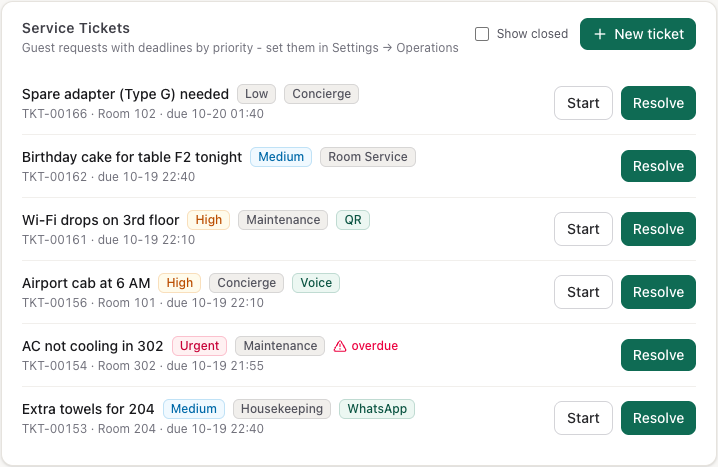
The Operations module is the desk's to-do list for guests: towels, a cab, a broken AC, a complaint. Each request is a ticket with a category, a priority and a deadline, whether a person or an AI agent raised it. The SLA Report shows whether requests are handled in time. Front Desk and Hotel Admin users see this module; only a Hotel Admin changes its settings.
Before you start
- Set the deadlines. Settings → Operations → Guest request deadlines: how many minutes a request of each priority may stay open. See Settings.
- Connect WhatsApp if guests should reach you there (WhatsApp setup). Messages from in-house guests then become tickets on their own.
Log a guest request
- Open Operations → Guest Requests.
- Press New ticket.
- Write the Subject ("Extra pillows for 201"), and pick the Category, Priority and Room. Add Details if staff need them.
- Press Create ticket.
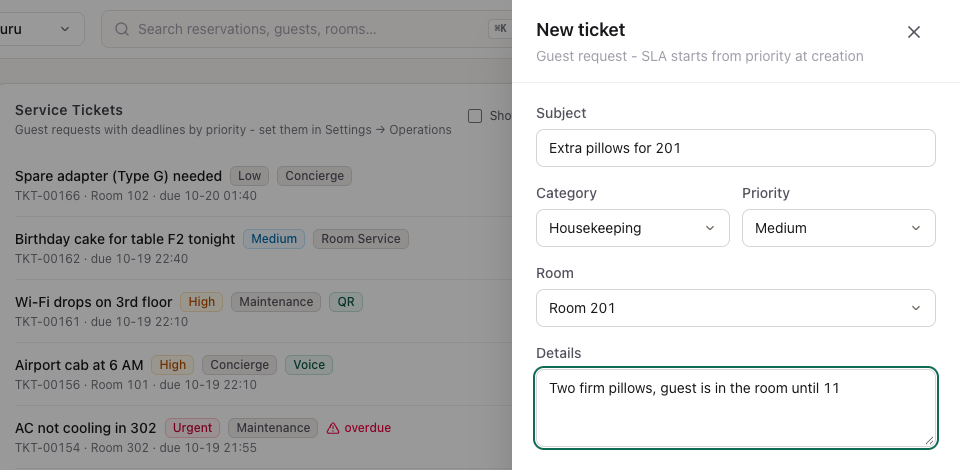
The deadline starts now: the ticket is due after the minutes set for its priority. The list shows it as due 10-19 22:40 (month-day, time).
Work a request through
Each open ticket has two buttons:
- Start when someone is on it. The ticket moves to In Progress.
- Resolve when it's done. The ticket moves to Resolved and leaves the list.

A ticket past its deadline shows overdue in red. Tick Show closed to see resolved, closed and cancelled tickets too; a ticket resolved after its deadline shows SLA breached.
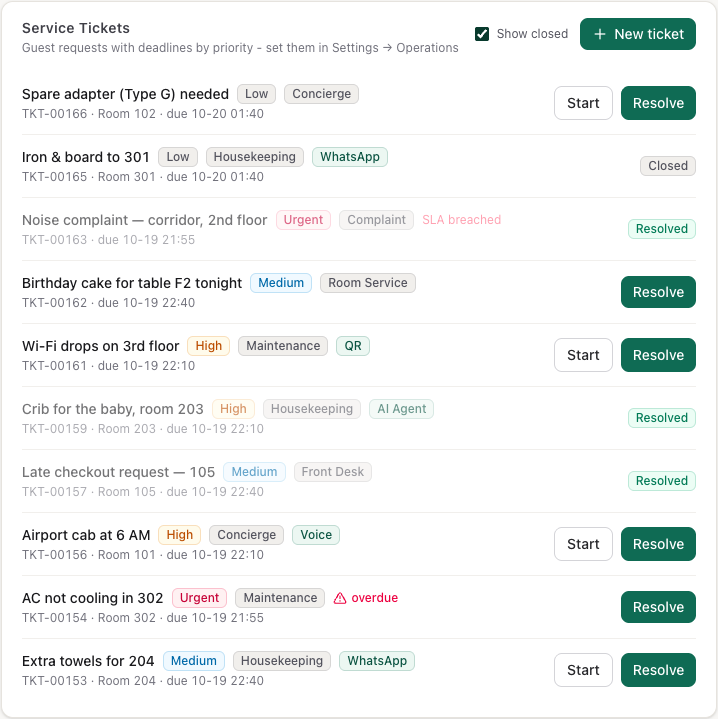
Closed and Cancelled are set by AI agents and integrations; the screen shows them but has no button for them.
Maintenance requests go to housekeeping
When you press Start on a Maintenance ticket that has a room, Kamra adds a Maintenance task to that room's housekeeping queue, with the ticket's priority and a note From ticket TKT-…. It shows on the Room Board and the phone app. If the room already has an open maintenance task, no second one is made.
Where tickets come from
The coloured badge after the category shows who raised the ticket. Tickets made on this screen have no badge.
| Source | How it gets there |
|---|---|
| (none) | Staff pressed New ticket |
| AI Agent | Kamra Agent, the in-app assistant, raised it, or an AI agent connected over MCP logged it (the create_ticket tool) |
| Voice | A voice agent on the hotel's phone line logged it |
| A guest's WhatsApp message made it (below), or an integration logged a WhatsApp request | |
| QR | An integration logged a request from a QR code |
WhatsApp messages from in-house guests. When a guest who is checked in, or has a confirmed booking, writes to your WhatsApp number, Kamra adds a ticket on its own: subject WhatsApp: … with the start of the message, category Front Desk, priority Medium, the WhatsApp badge, linked to the booking. The full conversation is in Operations → WhatsApp (see WhatsApp).
Categories
The category says which team handles the request: Housekeeping, Room Service, Maintenance, Front Desk, Concierge, Complaint or Other. The SLA Report breaks its numbers down by category, so pick the one that matches the team that will do the work.
Check the SLA Report
Operations → SLA Report answers one question: are guest requests resolved inside their deadline?
- Pick the dates at the top right. The default is the last 30 days. Tickets count by the day they were created.
- Read the four numbers: Tickets, Resolved, Breach rate and Avg resolve (time from creation to resolved). Resolved counts Resolved and Closed tickets.
- By category and By priority show the same numbers per team and per priority.
- Overdue now lists open tickets past their deadline and by how many hours.
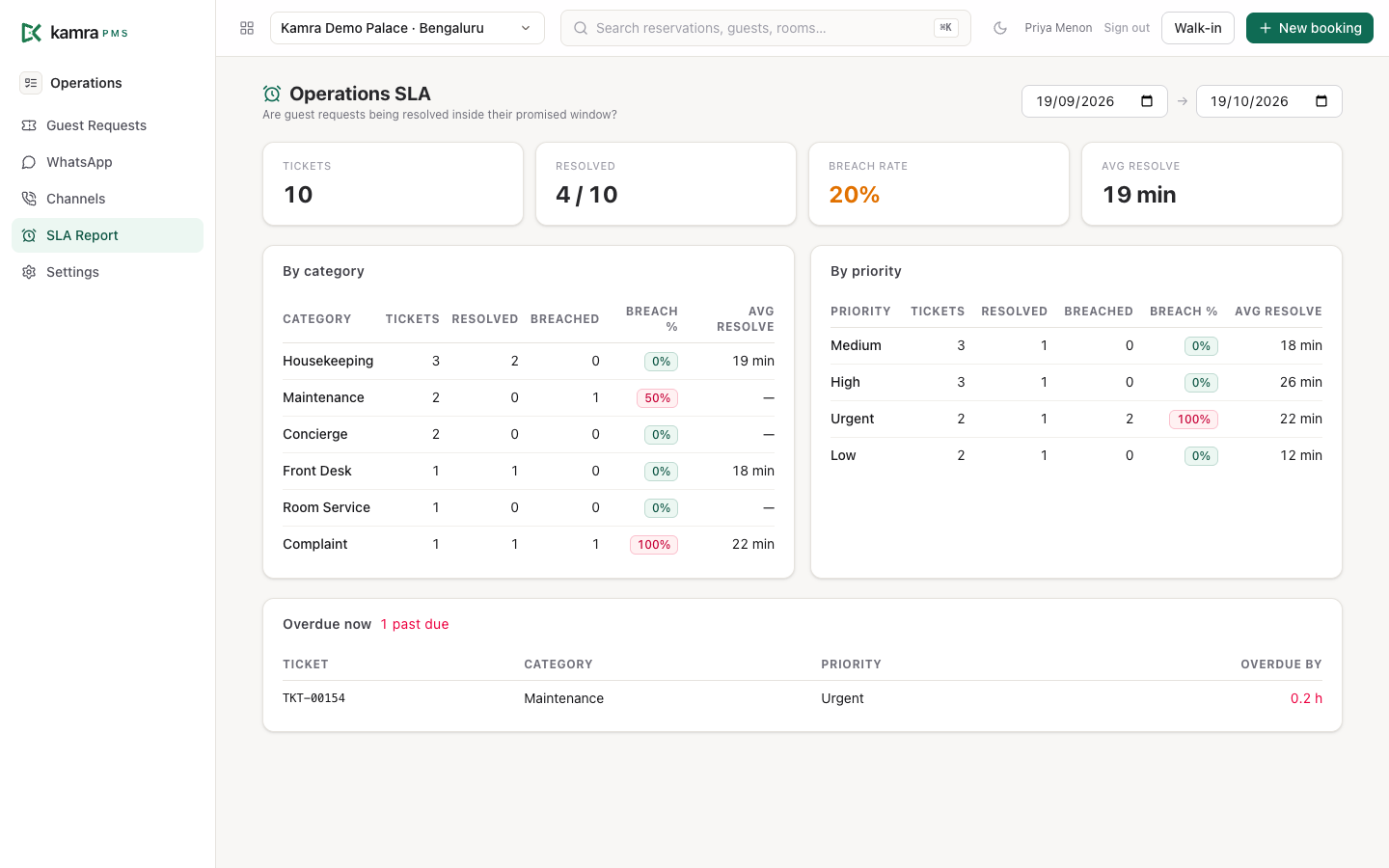
A ticket counts as breached if it was resolved after its deadline, or is still open past it. The breach rate turns amber at 10% and red at 25%. A ticket closed without being resolved first counts as resolved but adds no time to Avg resolve.
Stay instructions
When a booking is made, Kamra turns what the guest asked for into instructions for the team that does it:
| From the booking | Goes to |
|---|---|
| Special requests | Front Desk |
| Airport / station pickup (with the flight or train number) | Transport |
| Airport / station drop | Transport |
| Valet parking | Concierge |
| Early check-in or late check-out requested | Front Desk |
Each instruction is for one team and is Open until someone marks it Done. You find them in the Instructions card on the reservation (click the booking in Reservations).
- To add one, pick the team in the list (Housekeeping, Front Desk, F&B, Concierge, Transport, Maintenance or Security), write the instruction ("Fruit basket before arrival") and press Add.
- When it's done, press Done on its line. The line is struck through and shows who did it and when. Reopen puts it back to Open.
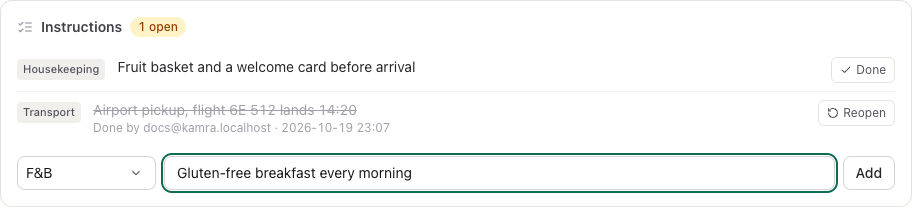
The card header counts the open instructions. You can't add instructions to a stay that is cancelled, checked out or a no-show. Front Desk adds them; Front Desk and Housekeeping can mark them done. Every change is in the activity log. For anything that needs a deadline and follow-up, log a guest request as well. Housekeepers see a booking's special requests on their task cards in the phone app.
Settings
Settings → Operations (Hotel Admin). Module on hides or shows the whole module.
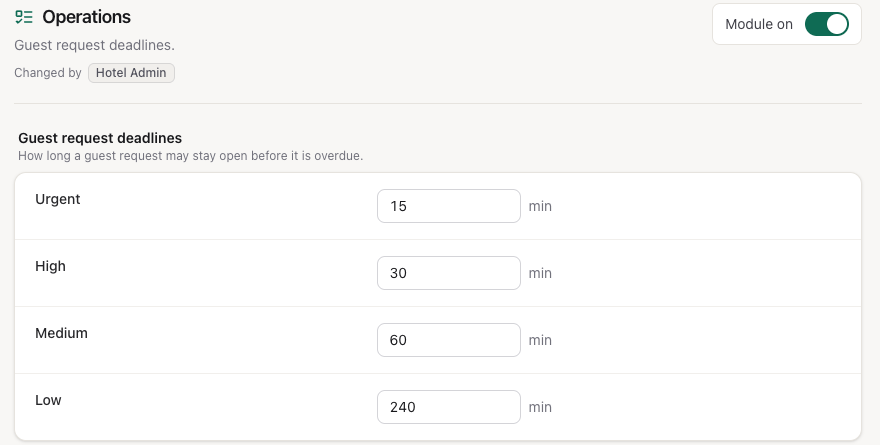
| Setting | Where | Default | What it does |
|---|---|---|---|
| Urgent | Guest request deadlines | 15 min | Minutes until an Urgent request is overdue |
| High | Guest request deadlines | 30 min | Minutes until a High request is overdue |
| Medium | Guest request deadlines | 60 min | Minutes until a Medium request is overdue |
| Low | Guest request deadlines | 240 min | Minutes until a Low request is overdue |
Housekeeping task deadlines are separate: Settings → Housekeeping (Housekeeping).
Good to know
- The deadline is fixed when the ticket is created. Changing the minutes in Settings only affects new tickets.
- Overdue requests are flagged on the list and in the report. Kamra doesn't send alerts for late guest requests; WhatsApp escalation is for housekeeping tasks only.
- The list shows the newest 200 tickets.
- Housekeepers don't see Guest Requests. Requests for them reach the phone app as housekeeping tasks only through maintenance tickets (above) or a task the desk creates.
- The list updates when someone else changes a ticket while live updates are on; otherwise reload the page.
Troubleshooting
WhatsApp messages don't become tickets. Only messages from a number that matches a guest with a confirmed or checked-in booking make a ticket. Check that the phone number on the guest's profile is the one they write from, with the country code (for example +91…).
A request isn't marked overdue. It is only overdue after its priority's minutes have passed since it was created. Check Settings → Operations.
No Maintenance task appeared. The ticket needs the Maintenance category and a room, and someone must press Start. Resolving it straight away doesn't create a task.
For developers
Tickets run on kamra.api.create_ticket, tickets_list and advance_ticket; the report is kamra.reports.sla_report. Stay instructions use kamra.api.stay_instructions, add_stay_instruction and set_stay_instruction_status. AI agents use the same calls as the MCP tools create_ticket, list_tickets and advance_ticket - see the MCP tools and the API reference.