
Channel manager (OTA sync)
Kamra syncs availability and rates to the OTAs - and receives their bookings - through a channel manager. The integration is a provider seam: adapters ship for Channex.io (usable today, self-serve), STAAH and AioSell (ready; they activate with the credentials those companies issue to connectivity partners).
Recommended: Channex.io, bring your own account
Channex.io is API-first channel-manager infrastructure - self-serve signup, per-property pricing paid directly to them, certified with Booking.com, Agoda, Expedia, Airbnb and more.
Create a Channex account, add your property and rooms, connect your OTA channels in their dashboard.
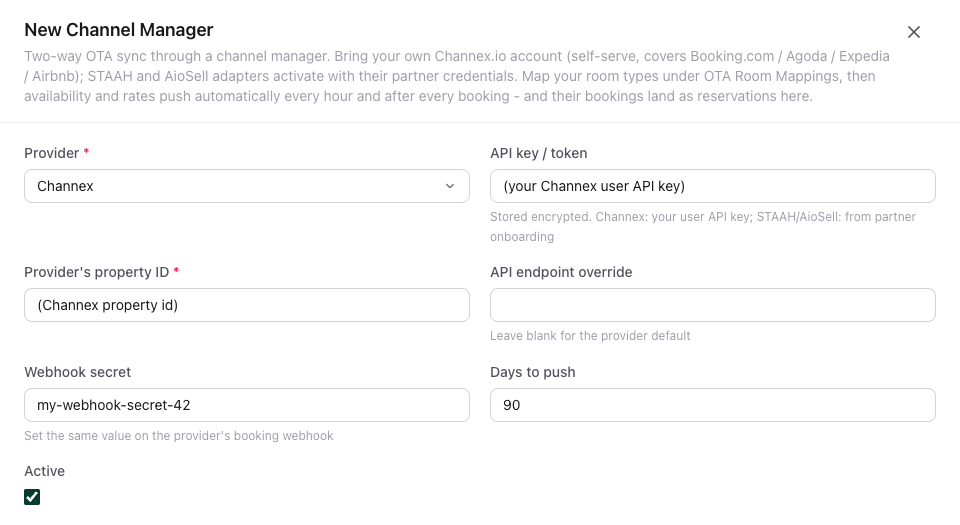
In Kamra: Revenue → Channel Manager → New: provider Channex, your Channex user API key, the Channex property id, and a webhook secret you invent. Tick Active.
Revenue → OTA Room Mappings: one row per room type - your room type against the Channex
room_type_idandrate_plan_id. The Connection and Room type lists only show the property you are working in. Kamra refuses a mapping whose room type belongs to another property than the connection.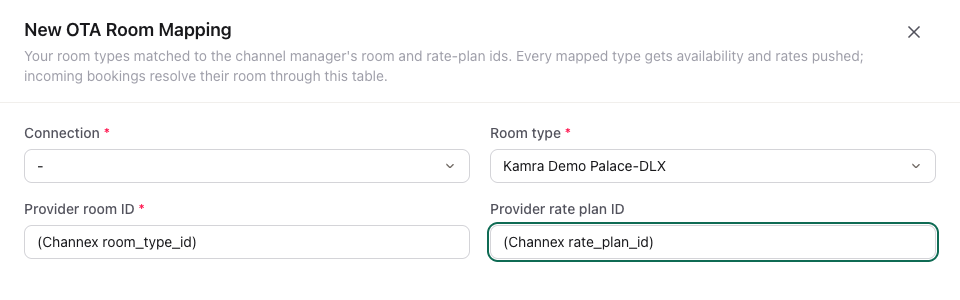
In Channex, register a booking webhook pointing at
https://YOUR-SITE/api/method/kamra.channel_manager.webhook?connection=CMC-XXXXXsending your secret in theX-Webhook-Secretheader.CMC-XXXXXis the connection's ID: it's the value you picked in the Connection field of the room mapping in step 3 (for exampleCMC-00001).
That's the whole setup.
What Channex sends
Channex does not get a fresh copy of the whole calendar every hour. Kamra sends only the dates that changed, joined into ranges:
- A booking, a season, a rate plan, a room going out of order, or a mapping queues those dates. A worker sends them within about a minute. Rate edits made inside the Rate batch window (seconds) (default 30) go out together.
- Availability and restrictions are separate calls. ARI calls per minute (default 10, which is what Channex allows) caps each of them. If Channex answers 429, that kind pauses and retries.
- A full copy of the horizon (500 days) goes out only when a Revenue Manager or Hotel Admin presses Full sync on the connection. If the last full sync was less than 24 hours ago, Kamra asks you to confirm. Channex admits one a day.
- Once a night, at 06:20, a sweep sends only the differences: the new day entering that horizon, and anything a trigger missed. It is not a full sync.
Open the connection under Revenue → Channel Manager. The panel Availability and rates sync shows Changes waiting, Failed changes, Last push and Last full sync. Import mapping reads Channex's rooms and rate plans, shows a preview, and writes the rows you apply. Anything it cannot place stays unmatched so you can map it by hand.
Bookings that arrive
- OTA bookings arrive as reservations: source OTA, the channel's name and booking reference kept, the guest matched by phone or email or created, the OTA's sell price preserved (never re-priced), and the same capacity and double-booking rules a front-desk booking obeys. Modifications and cancellations match on the OTA reference.
- The connection row shows the last push and its result. Failures land in the activity log. Rates still come from the pricing engine, with demand premiums and hurdle floors applied.
STAAH and AioSell
Both adapters ship in the codebase with the transport isolated to one function each. To activate: join STAAH's connectivity-partner program or ask AioSell for PMS-connect access, then enter the credentials and endpoint they issue on the connection row. No code changes needed for the standard flows; field name adjustments against their partner docs are expected on first certification.
STAAH and AioSell keep the hourly push of the whole window in Days to push. They do not use the Channex outbox, Full sync or Import mapping. The ARI calls per minute and Rate batch window fields are for Channex.
No channel manager? Key it in from the email
When an OTA booking reaches you only as an email, open New booking and set Booked via to the site: Booking.com, Agoda, Airbnb, Expedia, MakeMyTrip, Goibibo, or Other site for any other. Then enter:
- OTA booking ref - the reference in the email. Kamra refuses the same reference twice, so one email cannot be booked twice.
- Sold for (incl. tax) - the total the OTA charged. The stay is billed at that price, split across the nights, not at your rate card. Leave it empty to bill the rate card.
- Commission % - what the site keeps. It is prefilled from the site's default and you can change it per booking.
Several rooms in one OTA booking: add the rooms as usual. All of them share the one OTA booking ref, and the sold total is split across the rooms in proportion to their rate card prices. Walk-ins booked on an OTA the same day work the same way: set Booked via in the walk-in form.
Default commission per site: in Revenue > Travel Agents, add the site with type OTA and its Commission % (name it as it appears in Booked via, for example "Booking.com"). New bookings from that site, keyed in or from the channel manager, record the commission on the pre-tax room price unless the channel sends its own amount. Revenue Reports > Contribution analysis shows it in the Commission column; choose By channel to see it per site.
The booking is then tagged exactly like one that arrived through the channel manager: the site's name shows on Today, In House and the tape chart, and reports group it with the same site's API bookings (site names from the channel managers are matched up, so "BookingCom" and "Booking.com" count as one).
Is any of this gated?
No. The integrations are open source like everything else. You pay the channel manager directly for their service; with an implementation we can set it up for you.