

Books - suppliers, cash outlook, profit and loss
Three screens under Finance → Books help the owner and the finance team see the money side of the hotel:
- Payables: the suppliers you buy from on credit and the bills you owe them.
- Cash outlook: money expected in and out over the next 5, 15 or 30 days, day by day.
- Profit and loss and Balance sheet: a management view of a period, and of what is owed to and by the hotel on a date.
Finance and Hotel Admin see these screens.
Not statutory accounts
Kamra is your front office, not your general ledger. These screens count what Kamra records: guest and company bills, restaurant bills, banquets, supplier bills and petty cash. They leave out your bank balance, payroll paid outside Kamra, depreciation, loans and equity. Your accountant keeps the statutory books from Finance → Accounting Export.
Supplier bills or petty cash?
- Petty cash is cash paid out of the till today, with a voucher (a plumber paid on the spot, a taxi). See Pay small expenses from petty cash.
- A supplier bill is credit: the grocer, the linen contractor or the power company sends a bill and you pay it later, usually from the bank.
Use one or the other for each expense, never both, so it is counted once.
Add a vendor
- Open Finance → Payables and press New vendor.
- Enter the Vendor name, the Usual expense category and Pay within (days): the supplier's payment terms. Contact details and tax ID are optional.
- Press Save.
Click a vendor in the Vendors tab to edit it. A disabled vendor takes no new bills.
Enter a bill
- Press New bill.
- Pick the vendor, then enter the supplier's bill number, the bill date, the Amount before tax and the tax rate. Kamra works out the tax and the total.
- Leave Due date empty to use the vendor's terms (bill date plus their days), or type the date printed on the bill.
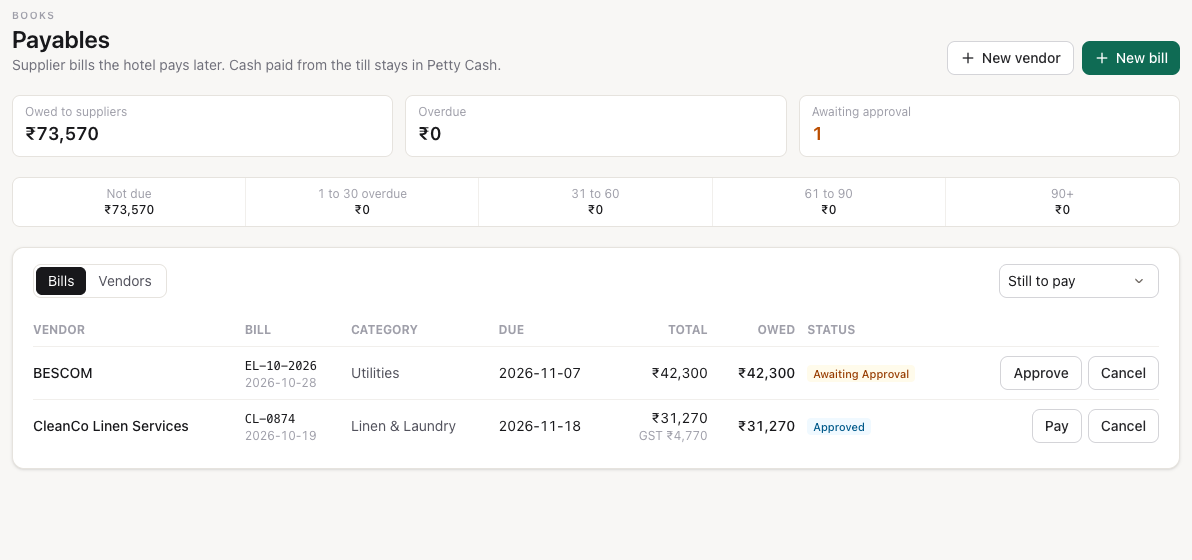
- Press Save. The bill is Awaiting approval.
Finance and Hotel Admin can enter bills. The same supplier bill number can't be entered twice.
Approve and pay
A Hotel Admin approves a bill. Once it is approved, Finance or a Hotel Admin can pay it.
- A Hotel Admin presses Approve on a bill that is awaiting approval.
- Press Pay, enter the amount (all of it or part), the date, how it was paid and a reference such as the bank transfer number.
- Press Record payment. The bill shows Part paid until it is fully paid.
Payments stay in accounts payable: recording one does not post to a general ledger and does not take cash out of a till. A bill entered by mistake can be cancelled with a reason, as long as nothing has been paid on it.
See what you owe
The top of Payables shows what you owe suppliers, how much is overdue and how many bills wait for approval. The strip below ages it by due date: not due, 1 to 30 days overdue, 31 to 60, 61 to 90 and 90+, the same buckets as company accounts.
Cash outlook
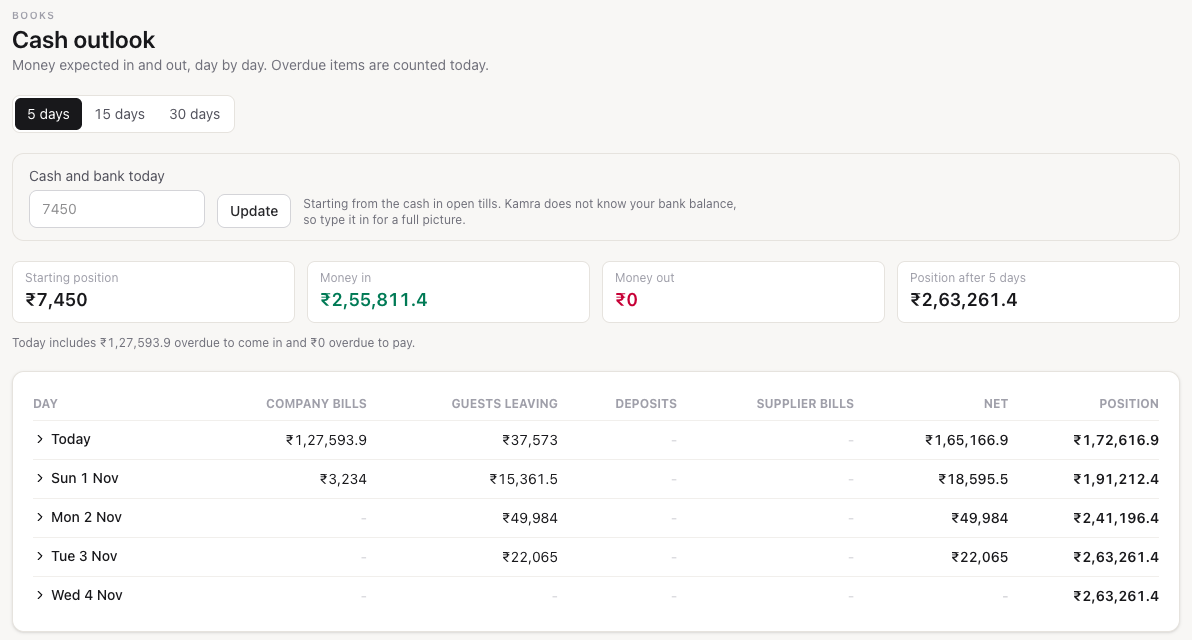
Finance → Cash outlook lists, day by day from today, for the next 5, 15 or 30 days (pick one at the top):
- Company bills: city ledger bills falling due.
- Guests leaving: what departing guests still owe. Stays a company pays on credit are left out; they come in later as company bills.
- Deposits: advance deposits due from guests arriving that day.
- Supplier bills: bills falling due. Draft bills still awaiting approval count too, marked draft when you open a day, and the total in drafts is shown above the table.
Anything already overdue is counted today. The position starts from the cash in open tills. Kamra does not know your bank balance, so type your cash and bank into Cash and bank today and press Update for a full picture. Click a day to see each item. The 15 and 30 day views add a subtotal after each week. On a phone the table shows each day's net and position; open a day for the detail.
Payroll, rent and other costs that you don't enter as supplier bills are not in it, and neither are extras guests may still spend.
Profit and loss
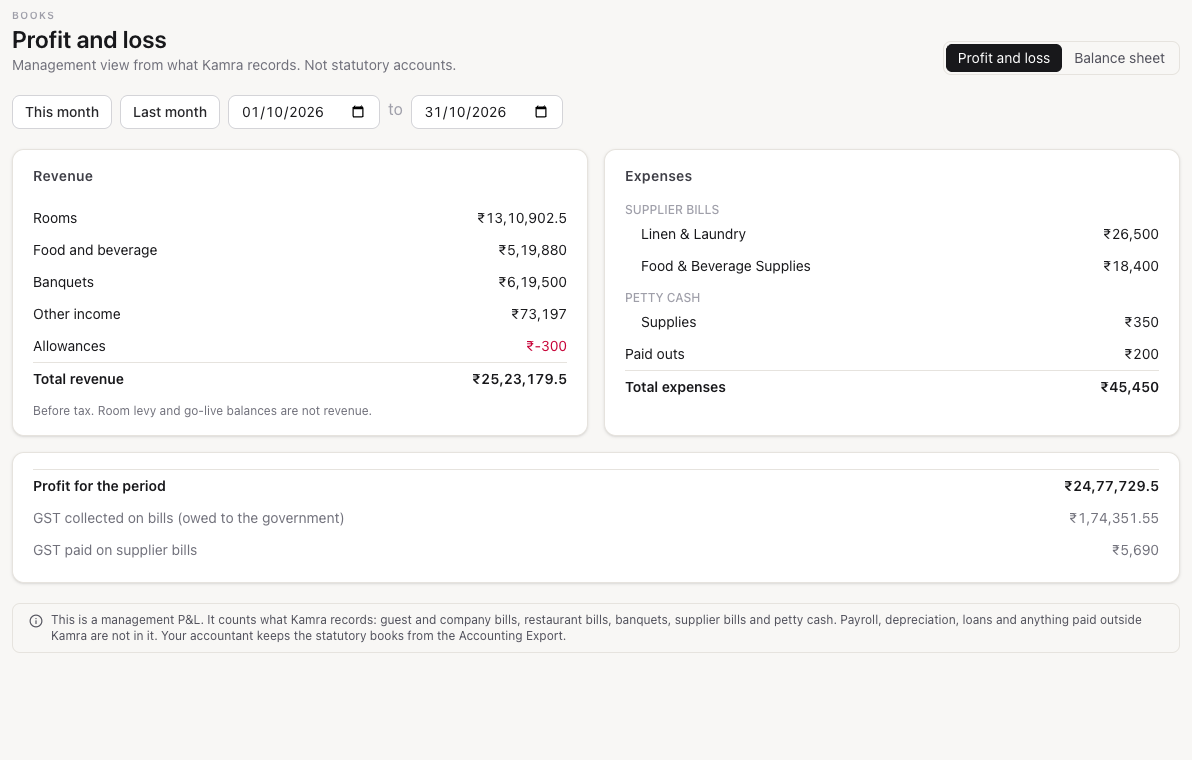
Finance → Profit and loss shows a period (this month, last month, or any dates up to a year):
- Revenue before tax by department: rooms (less room discounts), food and beverage, banquets and other income, less allowances (credit notes on settled bills included). Each sale is counted once: a restaurant bill charged to a room counts from the restaurant bill, and a banquet from the function on its event date. The room levy and go-live balances are not revenue.
- Expenses: approved supplier bills by category on their bill date, petty cash by category, and cash paid out from the tills. Bills still awaiting approval are left out until approved (the cash outlook shows them as drafts).
- Profit for the period, plus the tax collected on bills and the tax paid on supplier bills, for reference.
Balance sheet
Finance → Balance sheet (the second tab on Profit and loss) shows, as of a date:
- Owed to the hotel: guests in house (guest ledger), companies (city ledger) and, for today only, the cash in open tills.
- Owed by the hotel: advance deposits held and approved supplier bills not yet paid.
Tax collected this month is shown under the totals for reference. Kamra does not record what you have paid to the government, so it is not in the totals.
For developers and agents
Endpoints are in kamra.payables and kamra.books (see the API reference). Agents can read payables, the cash outlook (cash_forecast with days 5, 15 or 30), the P&L and the balance sheet, and can enter a supplier bill with create_vendor_bill; approving stays with a Hotel Admin and paying with Finance or a Hotel Admin, in Payables (see MCP tools).